Europe 43 Countries 5G eSIM-France Orange | Calls&SMS | Total 20GB/50GB/100GB/200GB | 5-30days | QR Code

Europe 43 Countries 5G eSIM-France Orange | Calls&SMS | Total 20GB/50GB/100GB/200GB | 5-30days | QR Code

4.7/5
Good
(116 reviews)
1K+ booked
Use anytime during validity
Book now for today
Booking confirmation
Non-refundable
From
HK$77.99
Device info

Product Description

Covered European Countries: Andorra, Austria, Aland Islands, Belgium, Bulgaria, Iceland, Poland, Denmark, Germany, Svalbard and Jan Mayen, France, Vatican City, Finland, Guernsey, Gibraltar, Netherlands, Czech Republic, Croatia, Latvia, Lithuania, Liechtenstein, Luxembourg, Malta, Isle of Man, Romania, Sweden, Switzerland, Cyprus, Slovakia, Slovenia, Jersey, Portugal, Ireland, Estonia, San Marino, Spain, Greece, Hungary, Italy, United Kingdom, Faroe Islands Data: Total 20GB/50GB/100GB/200GB Calls: Unlimited Calls to Covered European Countries SMS: Unlimited SMS to Covered European Countries

Network Coverage

Orange 4G/5G (Preferred Network)
Product details

Show less
Validity period
Valid for 180 days from the booking date, Valid for 1 use(s) only
What's included
Data
Calls
SMS
HOTSPOT
How to use
[How to Activate an eSIM]
Scan the eSIM and the eSIM will be automatically activated.
 
[Install eSIM]
 
** Install the eSIM upon arrival at your final desitination
 
** Do NOT delete the eSIM profile after installation.
 
**Ensure the eSIM is installed on the device you intend to use.
 
** This eSIM can only be installed once. Avoid installation more than 24 hours ahead of your scheduled activation date.
 
** Keep a stable internet connection throughout the eSIM installation process.
 
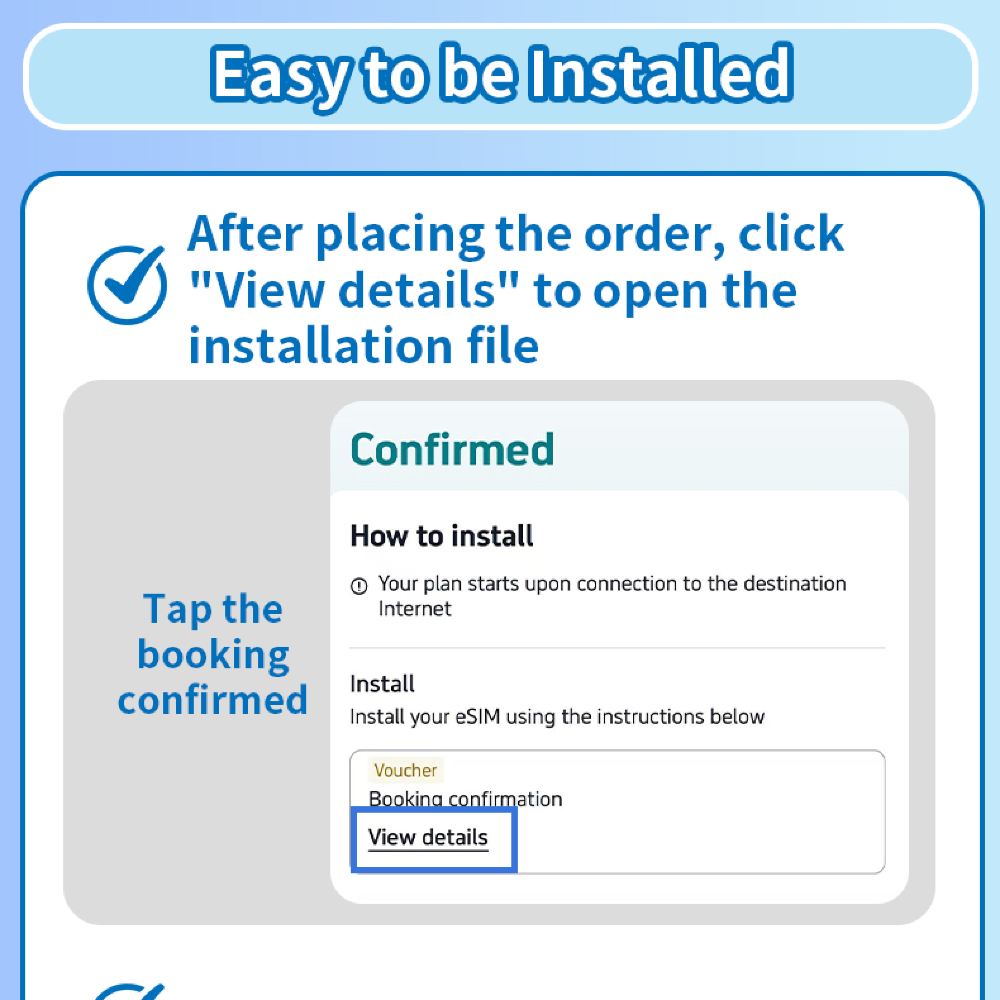
Option 1: Open the Trip App All Orders Select this order Voucher Tap Quick Link for one-click installation.
Option 2: Open the Voucher PDF attached in your email and scan the QR code.
 
[Using the eSIM]
If your device contains multiple physical SIM cards or other installed eSIM profiles, set this eSIM as your default cellular data line.
iPhone: Settings > Cellular > Cellular Data, select this eSIM as default
Android: Settings > Network & Internet > SIM cards, set this eSIM as default
Turn on Cellular Data (iOS) / SIM card data (Android).
 
[APN Settings]
No manual APN configuration is required for this local eSIM.
 
[Check Phone Number]
iPhone: Settings > Cellular > Select the corresponding eSIM
Android: Settings > Network & Internet > SIM cards
 
[Calls & SMS]
Local calls: Dial the number directly.
SMS: Send text messages following standard mobile texting procedures.
 
[Top-up Service]
Top-up is unavailable for this product.
Change & cancellation policies
Please note that the booking cannot be canceled once it is confirmed
The selected date and time cannot be modified after booking.
Important note

[Install eSIM]

An internet connection is required for eSIM installation. Scan the QR code to activate no earlier than 24 hours prior to your departure. Once you scan the QRCode, the eSIM will be automatically activated.


[Please do not delete the eSIM after the installation]

Each QR code can only be used for installation once. We are unable to assist if the eSIM has been removed from your device.


[To uphold the principle of fair network usage]

To maintain network connection quality and ensure fair usage, the telecom carrier may impose traffic restrictions on users who consume an excessive amount of data within a short period. This may result in slower network speeds. To guarantee your normal internet access, please avoid prolonged activities that consume large amounts of data, such as watching or downloading videos, updating software, and other similar high-data usage behaviors.

FAQ