Step-by-Step Guide to Trip.com Flight Cancellation

By Trip.com
June 28, 2026

Planning a holiday is thrilling, but unexpected circumstances can sometimes alter travel plans. If you've booked the flight via Trip.com and need to cancel, you may be curious about Trip.com Flight Cancellation Policy. This article will offer a step-to-step guide on how to cancel your flight booking.
New York
London
Rome
Paris
Sydney
Bangkok
See all flights


Trip.com Flight Cancellation General Rules

24-Hour Free Cancellation: Some flights offer free cancellation within 24 hours of booking—check the airline’s fare rules before confirming.
Refundable vs. Non-Refundable Tickets: Refundable fares have minimal or no penalties; non-refundable tickets often charge high fees (or no refund at all).
Airline Rules Apply: Budget airlines typically have stricter policies, while full-service carriers offer more flexibility.
Date Changes Instead of Cancellation: Many airlines allow changing travel dates/times (for a fee or fare difference) instead of canceling—often a better option.
How to Cancel Your Trip.com Flight Booking
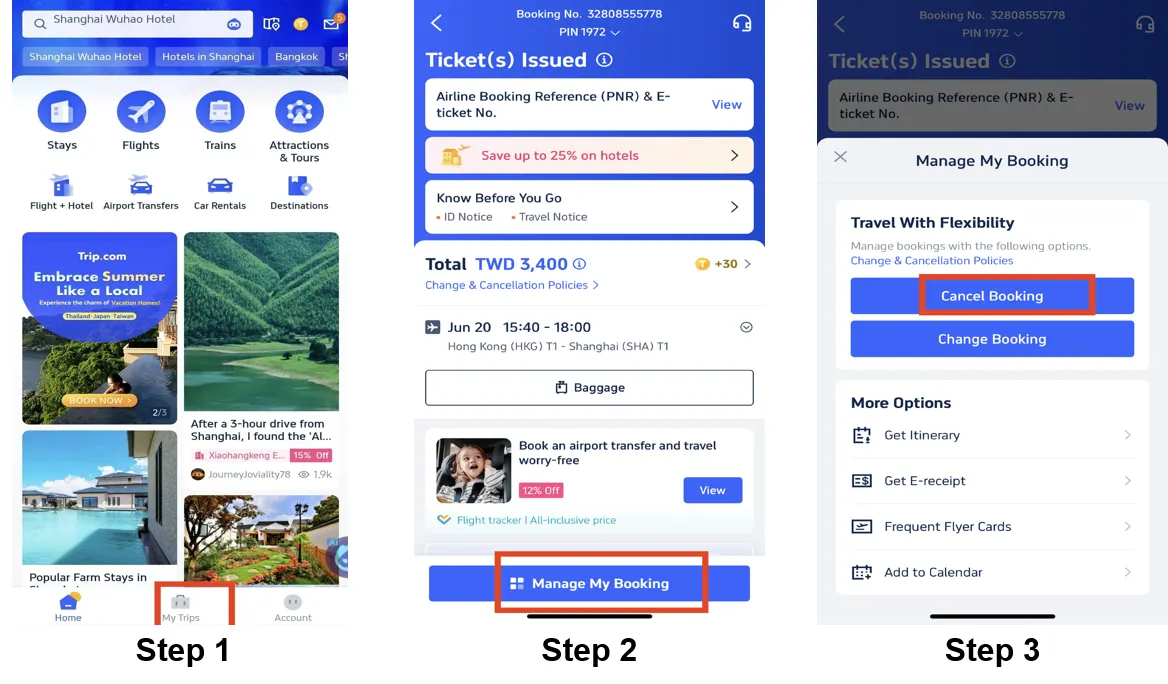
Step 1: Enter the Trip.com App to Cancel the Flight
Log in to your Trip.com account on your mobile device and Go to "My Trips" section. This is where you'll find all your bookings.
Step 2: Find the Flight Booking
Click on "Manage My Booking" to find the flight booking you need to cancel.
Step 3: Request the Trip.com Flight Cancellation
Tap the button "Cancel Booking" to cancel the flight booking. According to Trip.com Flight Cancellation Policy, cancelling flight will request service fee and cancellation fee.
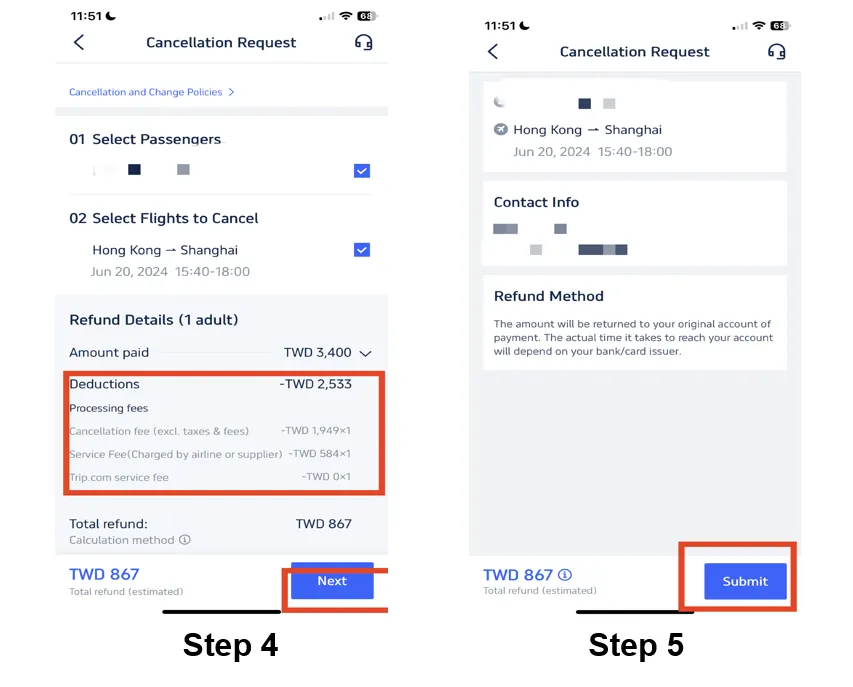
Step 4: Confirm the Trip.com Flight Cancellation
Check out the refund detail and confirm the Processing fees that making by cancelling flights, then click on the button "Next" to enter the detail page.
Step 5: Submit the Trip.com Flight Cancellation
Check your refund detail and refund info and tap "Submit" to complete the procedure.
Stay Connected With Trip.com!
See all attractions
 659539 booked













Trip.com Flight Change & Refund Fees
Flight change and refund rules on Trip.com follow local Canadian airline standards and CTA travel rules, and fees are not fixed for all tickets. These key points are tailored for Canadian travelers, helping you avoid unexpected extra costs.
- Basic Fee Rules: All fees follow the operating airline’s rules. The final cost will be shown clearly on your order page before you pay.
- Change Fee Breakdown: Change fees have two parts — airline change fee plus price difference between old and new tickets. Pay extra if the new ticket costs more. Basic Economy tickets have higher change fees, and some cannot be changed at all.
- Refund Rules in Canada: The closer to your flight departure time, the higher the refund fee. Most cheap discount tickets only refund Airport Improvement Fee (AIF), taxes and fuel surcharge (common in Canada); full-price tickets have much looser refund rules, and no refunds are allowed after the flight takes off.
- Free Change/Refund: If a flight is cancelled or delayed for reasons within the airline's control, the airline must rebook the passenger. If the airline cannot provide a confirmed reservation that accommodates the passenger's travel needs, the passenger can choose a refund. Airlines must send your refund within 30 days as required by CTA rules.
Tips to Avoid High Cancellation Fees on Trip.com

- Book “Free Cancellation” Products: Look for the “Free Cancellation” tag on hotels/flights for flexibility.
- Cancel Early: As the travel date approaches, the cost will increase, so take action as soon as possible to minimize the expense.
- Purchase Travel Insurance: Cover unforeseen cancellations (illness, emergencies) to avoid losing your full booking cost.
- Read Fare Rules: Budget airlines and discount hotels usually have strict non-refund policies, so do check before booking.
- Use the App: Many perks can only be obtained (like the privilege to cancel trains) through the Trip.com app.
Quick Tip for Travel: Always check your ticket rules carefully before changing or refunding. Don’t skip this step, or you may waste money on unexpected fees.
[10% OFF] Global Hotel Recommendations
New York
London
Rome
Paris
Sydney
Bangkok
See All Hotels

















































Trip.com Flight Cancellation Policy FAQs
-
Does Trip.com allow flight cancellation?
-
Does Trip.com charge a flight cancellation fee?
-
Can I get 100% refund on flight cancellation?
Disclaimer: This article has been provided by an individual contributor or third party platform. If there is any discrepancy regarding the copyright, please contact us directly and we will delete the content immediately.
Trending Searches
-
Trip.com links
-
eSIM/SIM card
-
Air travel guide
- Trip.com Cancellation Policy
- Trip Coins
- Trip.com Flight Change
- Trip.com Flight Cancellation Policy
- Trip.com E-Ticket
- Trip.com Payment Methods
- Trip.com Phone Number
- Trip.com Hotel Refund
- Trip.com Membership
- Trip.com Check in
- Trip.com Ticket Issued Status
- Trip.com Flight Ticket
- Trip.com Baggage Allowance
- Trip.com App
- Trip.com Booking Change
- Trip.com Refund
- Trip.com Call Center
- Air Flexibility
- How to List your Property on Trip.com
- Trip.com Booking Confirmation