Flight Refund Steps & Cancellation Policy

September 24, 2026
Changing travel plans can be stressful, but getting a flight refund from Trip.com doesn’t have to be.
If you’ve booked a flight and need to cancel, understanding the Trip.com flight refund policy will help you avoid unnecessary delays and extra costs.
This guide walks you through how to request a refund on Trip.com, explains the flight cancellation rules, and outlines how long it typically takes to get your money back.
to Manila
to Shanghai
to Tokyo
to Seoul
to Bangkok
See all flights


Understanding the Trip.com Flight Refund Policy

Trip.com acts as your travel agent, so your refund depends on both the airline and your ticket type.
Key points of the Trip.com flight refund policy include:
Key Factor | Policy Details / Refund Rules |
|---|---|
Refundable vs. Non-refundable Tickets | Refund eligibility depends on the fare rules of your ticket. Refundable tickets allow for full or partial refunds, while non-refundable tickets may only qualify for a partial refund, a refund of taxes, or an airline voucher for your next adventure. |
Airline rules apply | Trip.com processes the refund on behalf of the airline. The airline’s refund policy determines the final refund amount, applicable fees, and the processing timeline. |
Flight Status: Your Key to a Smooth Trip! | If the airline cancels your flight, you're usually entitled to a full refund. If you choose to cancel your trip yourself, just keep in mind that cancellation fees or fare restrictions may apply. |
💡Quick tip: Always review the Trip.com cancellation policy in your booking details before making any changes.
How to Request Your Trip.com Flight Refund
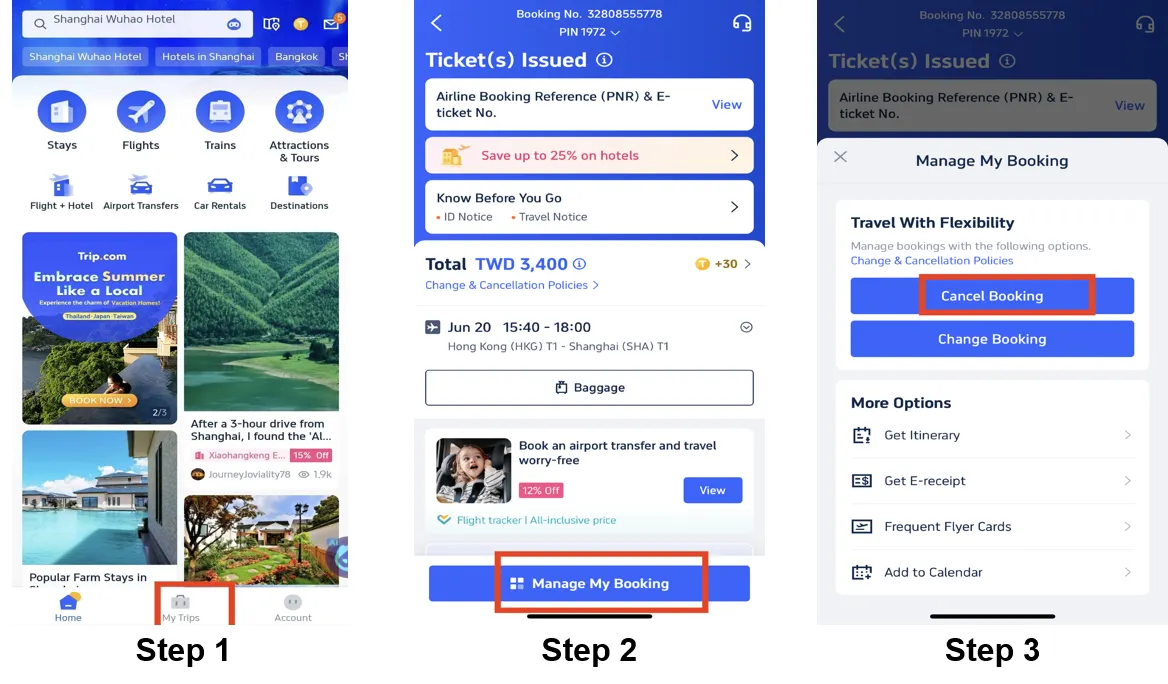
Step 1: Log in to your Trip.com account
- Head over to the Trip.com website or open the Trip.com app, and log in to your account.
- Click on the "My Trips" section
Step 2: Access your bookings
- Click on "Manage My Bookings" to find the flight booking you need to cancel.
Step 3: Select the flight you'd like to cancel
- Click on "Cancel Booking" to cancel your flight booking.
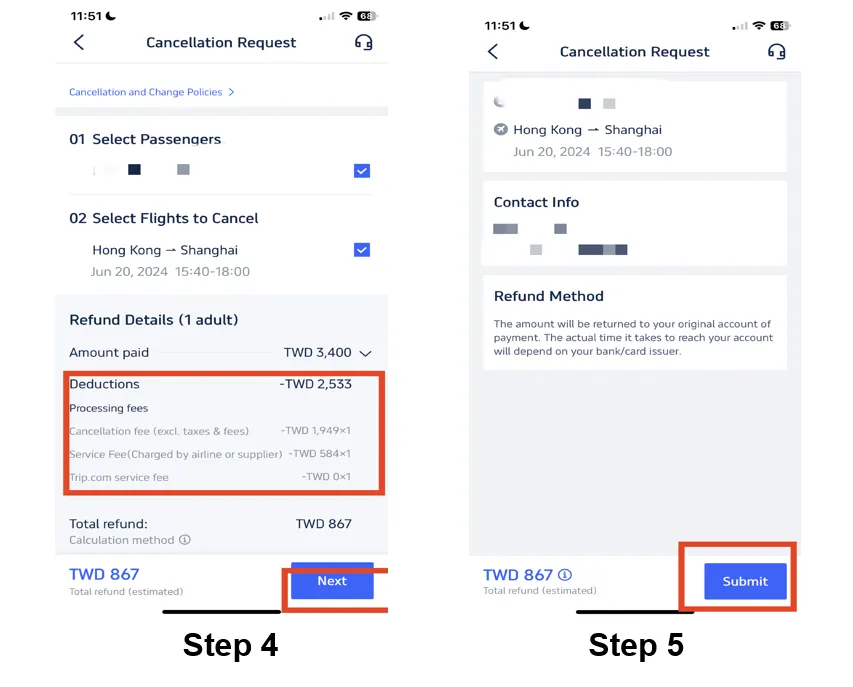
Step 4: Check the flight refund policy
- Click on your flight booking to view the details.
- Before you finalize your cancellation, always take a peek at your flight booking's refund policy.
- Take a look at the refund policy and double-check the processing fees.
- Once you've done that, click "Next" to head to the next page.
Step 5: Request a flight cancellation
- If your flight is eligible for a refund,review your refund details and tap "Submit" to complete the process.
- Follow the prompts to provide any necessary information or reasons for your flight cancellation.
Step 6: Confirm your cancellation and refund
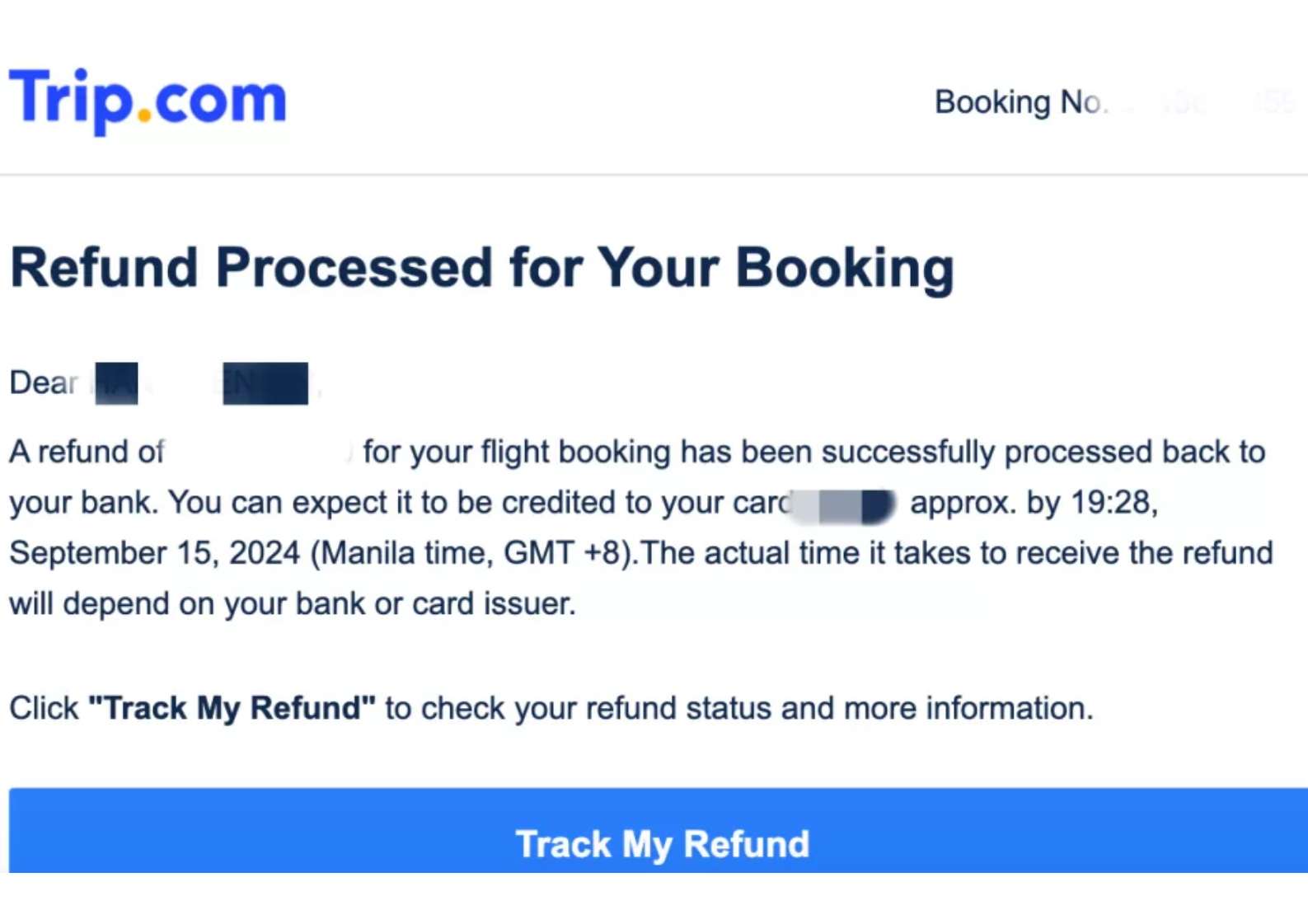
- Once you've submitted your flight cancellation request, go to your Trip.com account to check your refund status.
- Your refund will be credited to your account within a couple of days.
Trip.com Refund Processing Time

How long does a Trip.com refund usually take?
It depends on your payment method and the airline:
Payment Method | Estimated Trip.com Refund Time |
|---|---|
Credit / Debit Card | 7–15 business days |
PayPal / E-wallets | 3–7 business days |
Bank Transfer | Up to 30 days |
✈️For travellers: If your refund is delayed, reach out to Trip.com customer service via live chat or our hotline.
See all attractions
 2570 booked






Contact Trip.com Canada Support (Refunds)

If you’re based in Canada, Trip.com customer service is available 24 hours a day to help you with your travel adventures.
Our support team can help with:
| Support Category | Details |
|---|---|
Got a Question About Your Flight or Hotel Booking? | Assistance with booking errors, missing confirmations, or reservation issues |
Itinerary Updates | Easily adjust your flight times, hotel dates, or travel plans |
Refunds or Cancellations | Help with refund requests and cancellation policies |
Payment and Billing Questions | Help with payments, invoices, or duplicate charges |
Hours | 24/7 (English and Mandarin support available) |
What You Need to Know About Trip.com Ticket Cancellations
Trip.com Cancellation Protection
Trip.com sometimes offers optional add-ons or insurance-style products at the time of booking, giving you extra cancellation flexibility beyond the basic fare rules.
These are often marketed as “Cancellation Guarantee,” “Trip Air Flexibility,” or similar protections.
With this protection, you're all set:
- You might be able to cancel your flight and receive a full refund—even on non-refundable tickets—as long as you cancel within a specific time window before departure. This isn’t part of standard airline policy, but rather an optional service purchased through Trip.com to keep your travel plans flexible!
- The exact terms (such as the cancellation window and refund guarantee) depend on the specific product you select at checkout.
- Just a heads-up: Trip.com needs to recover the funds from the airline first, so our protection typically covers cancellation fees and ensures you'll get your refund once the airline has processed it.
👉 Important: This isn't the same as an insurance policy from a third-party insurer. It's an add-on sold by Trip.com that can waive some restrictions if you cancel within the allowed time frame.
Trip.com 24-Hour Cancellation Policy (Canada APPR Rules)

The Canada APPR, Air Passenger Protection Regulations, guarantees a 24-hour cooling-off period for flights to/from Canada booked more than 7 days in advance
- For many flights booked through Trip.com, you can cancel for free within 24 hours of booking and receive a full refund, provided the fare rules allow it and your flight departure is far enough in the future.
- Just a heads-up—this 24-hour cancellation window depends on the airline’s policy and how your Trip.com booking is set up, so it isn't automatically guaranteed for every flight. To make sure you're covered, feel free to reach out to Trip.com support to confirm your eligibility!
👉 Tip: Always check your booking’s specific terms right after purchase! The Trip.com app or confirmation email usually shows whether free cancellation within 24 hours is allowed.
Trip.com Cancellation Fees
Most airlines charge a cancellation fee, and Trip.com may also apply service fees.
The exact amount depends on:
Potential Deduction | What It Means for Your Trip.com Refund |
|---|---|
Airline Cancellation Fees | Airlines might apply a cancellation fee, which would be deducted from your refund. Just remember, this fee can vary depending on the airline, your chosen route, and the fare type you booked. |
Non-refundable Ticket Rules | Non-refundable tickets usually don't allow for a full refund. In some cases, only airport taxes or a partial amount may be refunded. |
Service Fees (Rarely Applied by Trip.com) | Trip.com generally doesn't charge service fees for refunds, though in rare cases, a small processing fee may apply depending on the booking conditions. |
💡 Tip: Cancel as early as possible to reduce fees.
Final Thoughts

Navigating a Trip.com flight cancellation refund policy or voluntary cancellation doesn’t have to be stressful.
By understanding the Trip.com flight refund policy and following the right steps to refund your Trip.com flight ticket, travellers can recover their funds efficiently.
To keep your journey smooth and stress-free, always double-check your ticket type and airline rules before booking to minimize any surprises.
Best Hotels Worldwide
See All Hotels








Trip.com Flight Refund FAQs
-
Does Trip.com charge a cancellation fee?
-
Can I cancel a non-refundable Trip.com ticket?
-
Are promotional or discounted Trip.com tickets refundable?
-
How do I contact Trip.com customer service about my refund?
-
How do I know if my Trip.com ticket is refundable?
-
Can I get a refund for a non-refundable ticket?
Disclaimer: This article has been provided by an individual contributor or third party platform. If there is any discrepancy regarding the copyright, please contact us directly and we will delete the content immediately.
Popular Searches
-
Air travel guide
-
Latest Flight Deals
-
eSIM/SIM card