
China eSIM with VPN: Access Western Apps & Unlimited 5G

This guide gives Canadian travelers a simple breakdown of using a China eSIM with a built-in VPN—must-have for anyone visiting China from Canada. You’ll find top data plans, device compatibility checks, easy setup steps, honest provider reviews, and help deciding if an eSIM+VPN combo works better than a traditional SIM+VPN.
To Shanghai
To Beijing
To Guangzhou
See all flights


Best 3 China eSIM VPN Data Plans
💥 Limited-Time Offer: New to Trip.com? Get an extra 5% off selected China eSIM plans! Just grab the coupon, sign up for a free account, and the discount applies automatically at checkout. It makes Trip.com’s already affordable plans even better!
When picking an eSIM, focus on value and a plan that matches how long you’ll stay. Here are 3 top-rated options with built-in VPNs—most offer unlimited data, so you’ll still stay connected (at slower speeds) even after hitting your daily high-speed limit!
CMCC China 4/5G eSIM
- CoverageMainland China
- Data0.5G-3GB/day ; 1-50GB Total
- Validity1 to 30 Days
- PriceFrom CAD 0.30

China Mobile 5G eSIM
- CoverageMainland China
- Data0.5G-3GB/day ; 1-50GB Total
- Validity1 to 30 Days
- Price From CAD 0.30

China/HK/Macau eSIM
- CoverageChina
- Data0.5-100GB/Day ; 3-50GB Total
- Validity1 to 30 Days
- Price From CAD 0.31
Accessing Western Apps in China: VPN Needed?

If you’re a Canadian traveler staying in China for a short period of time, staying connected with a VPN built-in eSIM is the best option. No need to stress about setting up extra VPNs to use your go-to apps—Instagram, TikTok, Google, WhatsApp all work right away, no extra steps. Important note: eSIMs with built-in VPNs from trusted platforms like Trip.com are fully compliant with local rules, so you can use them legally and hassle-free.
Plus, essential Chinese travel apps—like Amap (similar to Google Maps) for navigation or Alipay for mobile payments—work smoothly with just the eSIM’s data, no extra setup needed. Unlike physical SIMs, eSIMs are totally digital—no fussing with tiny cards or extra gear. You can buy and activate your plan online before leaving Canada, saving time when you arrive.
Apps Accessible by China eSIM with VPN

A good China eSIM with a built-in VPN lets you use both international and local apps, covering all your travel needs. Here are the international ones you can access easily:
- Social Media: Instagram, Discord, TikTok, Facebook, Messenger, WhatsApp, Twitter/X (all popular with Canadians, fully accessible with the built-in VPN)
- Productivity: Google Search, Gmail, Google Maps (tools you probably use daily back in Canada for work and navigation)
- Entertainment: YouTube and Netflix (availability varies by region, but most popular Canadian shows should be accessible)
Which to Choose?: eSIM with Built-in VPN vs. SIM + VPN
Here’s a side-by-side comparison to help you pick the best option for your trip:
Eligibility Requirements | eSIM with Built-in VPN Access | Physical SIM + VPN access |
|---|---|---|
Convenience | High: Digital activation (buy online before leaving Canada), no physical card needed | Low: Buy a SIM locally (ID required) and set up a VPN yourself |
Stability | Reliable: Partnered with official Chinese mobile operators, great coverage in most tourist areas | Hit-or-miss: VPN connections depend on the physical SIM’s network quality |
Price | Budget-friendly: All-in-one (data + VPN), no hidden fees or separate subscriptions | Higher costs: Pay separately for SIM, data plan, and VPN |
Perfect For | Most Canadian travelers, especially short getaways (1–30 days) wanting a hassle-free, plug-and-play solution | Backup: Only if your device isn’t eSIM-compatible or you need emergency connectivity without WiFi |
China eSIMs with VPN Providers & Reviews
Based on real feedback from Reddit (popular with Canadian travelers), these are the most reliable eSIM providers for your China trip:

China Mainland 5G eSIM | Three Networks Supported, ChatGPT & Google Maps Supported | 500MB/Day - 100GB Total | 1-60 Days | 24-Hour Billing | QR Code
4.5/5
9750 reviewsI drove around southern Xinjiang and had good signal all the way, except for some places on the desert highway where there was no signal. It's very cost-effective and I recommend using it.
Mainland China 5G eSIM | 3 Carriers · All AI & TikTok | 1–365 Days | QR Code
4.5/5
8671 reviewsGreat eSIM, with functional data sharing. WhatsApp, Facebook, Instagram, and Google worked normally. The IP address was from Singapore, which allowed Amazon (Kindle) to work perfectly, something my other eSIM, which used a Hong Kong IP address, didn't do. An important tip: as soon as I activated the eSIM, it fluctuated between 4G, but after restarting the phone, it stayed on 5G all the time. 500MB per day seems sufficient for those who will only use the internet without watching videos, or 1GB per day if watching a few videos. Don't forget to disable automatic app updates to avoid using up your data plan.

Mainland China/Hong Kong/Macau 5G eSIM | 5 Carriers | Day Pass/Total Data Package | 24-Hour Billing | QR Code
4.6/5
21989 reviewsSuper convenient! Forget about searching for physical SIM cards. We bought one and installed it right away at the Hong Kong cruise port. It took me a minute to install it using the link in my booking. The speed is excellent, and the price is reasonable. It's also available for sharing. I definitely recommend it to all travelers!

5G/4G eSIM in 8 Asian countries | Multi-network support, supports ChatGPT & Google Maps | 500MB/day - 50GB total | 1-30 days | 24-hour billing | QR code
4.6/5
6628 reviewsHopefully everything will go well, but the others I've bought work perfectly, so I hope this one will be the same.

Mainland China 5G eSIM | Day Pass/Total Data Package | ChatGPT Available | 24-Hour Billing | 1-365 Days | QR Code
4.6/5
67076 reviewsThis hotel truly exceeded my expectations! I was immediately struck by the exquisite decor of the lobby upon entering; the environment was clean, elegant, and the atmosphere was fantastic. The rooms were spacious and bright, the bedding was soft and comfortable—I didn't want to get up! The attention to detail was remarkable, exuding a sense of luxury throughout. The staff were warm and attentive, efficient and considerate from check-in to check-out, always ready to help, making me feel incredibly welcome. The location is excellent, convenient for travel, and surrounded by amenities. Overall, a perfect experience, excellent value for money, suitable for both travel and vacation. I will definitely choose this hotel again next time; highly recommended! [Party]
Trip.com
- Highlights: Great value, flexible plans for all trips—from short Shanghai weekends to long cross-city adventures (including Hong Kong and Macau). Partnered with official Chinese operators (legal and reliable), 24/7 English customer support (a big plus if you don’t speak Mandarin), and easy app activation.
- Downside: Must install via the Trip.com app (don’t worry—it’s user-friendly!).
- Perfect for: All travelers, especially those wanting a simple, affordable option with English support to avoid language barriers.
Airalo
- Why You Might Like It: Globally trusted, reliable, and offers small data plans for light travelers (e.g., 3GB over 30 days).
- Downside: A bit pricier than Trip.com, fewer high-data options (for streaming/remote work), and less cross-regional coverage.
- Good for: Travelers who only need a little data for emails on the go.
Holafly/Nomad
- Why You Might Like It: Popular in Western markets (including Canada), with unlimited data options. Familiar interfaces for Canadian users.
- Downside: Mixed Reddit feedback—some Canadians had spotty connections in remote areas (e.g., rural Guilin or Yunnan). Also pricier than Trip.com.
- Suitable for: Those already familiar with these brands, and prefer their interface.
Trip.com’s eSIM Partner Operators
Trip.com partners with China’s three major mobile operators, ensuring smooth, legal coverage across your trip:
- China Mobile: Covers most major cities and tourist spots—from Beijing to Guilin’s karst mountains. Stable 4G/5G for social media, navigation, and mobile payments.
- China Telecom: Exceptional stability, even in remote areas (e.g., rural villages, suburbs). Perfect if you’re exploring off-the-beaten-path spots.
- China Unicom: Seamless network switching across all China regions with one eSIM—no need to swap plans or eSIMs. Great for easy cross-city travel.
Checking for Device Compatibility with a China eSIM
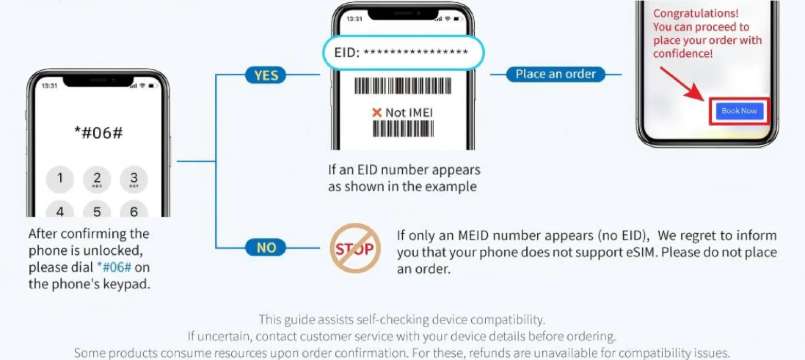
Before buying an eSIM, check if your phone is compatible with this quick step:
- Dial *#06# and press call to see your device’s sepcial ID.
- If your device supports eSIM, an EID (Embedded Identity Document) will appear. No EID means it doesn’t support eSIM.
Pro Tips:
- iOS: Need iOS 12.1+ (or iOS 17.4+ to install directly via the Trip.com app)—most modern iPhones used by Canadians qualify.
- Android: Need Android 8.1+.
Note for Canadians: Since December 1, 2017, CRTC rules require all mobile devices sold in Canada to be unlocked by default. Carriers must also unlock existing devices for free. You rarely need to worry about carrier locks blocking international eSIMs, but double-check with your home provider if you have an older device.
China eSIM with VPN: Installation & Use
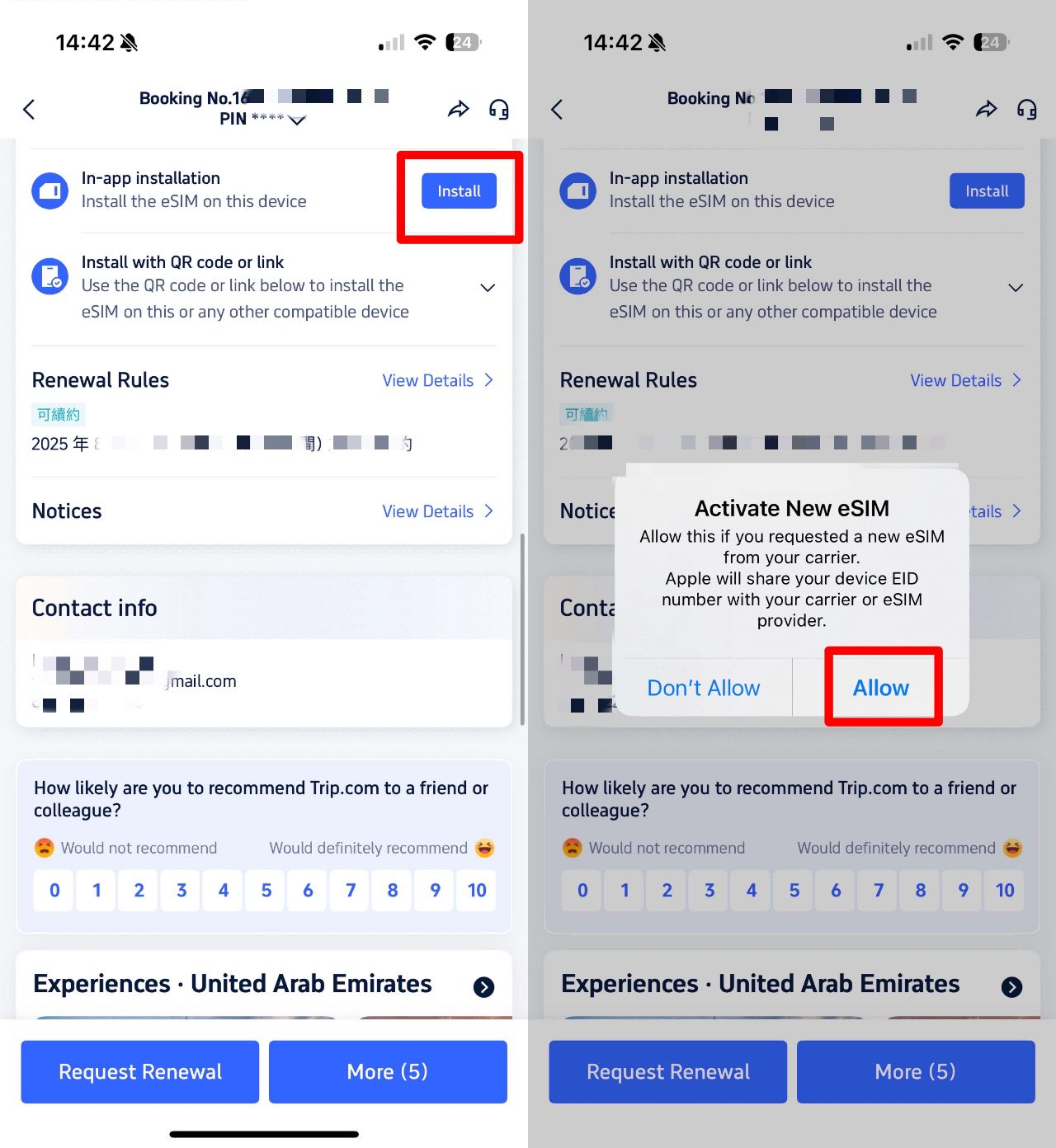
Before installing your eSIM, connect to stable WiFi or mobile data (easy to do at home before departure).
Trip.com eSIM note: Each QR code/activation link works for one device—set it up on the phone you’re bringing to China.
Option 1: Direct Installation (iOS 17.4+ & Trip.com App)
- Open the Trip.com app, go to “Account,” then tap “All Orders.”
- Find your eSIM order and tap “Install” (no QR code needed).
- Follow on-screen prompts to activate.
Option 2: QR Code or Manual Installation (All Other Devices)
- Open your eSIM order in the Trip.com app, save the QR code (print it or save to another device).
- Go to your device’s settings:
- iOS: “Cellular Network” → “Add Cellular Network”
- Android: “SIM Card Management” → “Add SIM Card”
- Scan QR code. If stuck, enter the “SM-DP+ Address and Activation Code” from your Trip.com order confirmation.
Still having trouble? Your phone might be carrier-locked—contact your Canadian provider to unlock it (free, per CRTC rules) and you’ll be set.
Avoid Roaming Charges & Troubleshoot
To avoid any surprise roaming charges from your Canadian carrier, turn off your primary Canadian SIM and switch on the eSIM. Also, don't forget to turn on data roaming:
- iOS: “Settings” → “Cellular” → “Data Roaming”
- Android: “Settings” → “Connections” → “Mobile networks” → “Data Roaming”
If no internet: Manually set the APN to “cmhk” (rarely needed, but effective!). Then, restart your phone after setting the APN to activate.
Renewing Your China eSIM
Your renewal plan starts automatically when your initial plan ends—no need to rescan the QR code. If your current plan has low-speed data, that will be used first; restart your phone to switch to the new plan for high speeds.
Want to switch the eSIM to a different device? You’ll need to buy a new plan—renewals can’t be transferred.
VPN Usage Tips in China
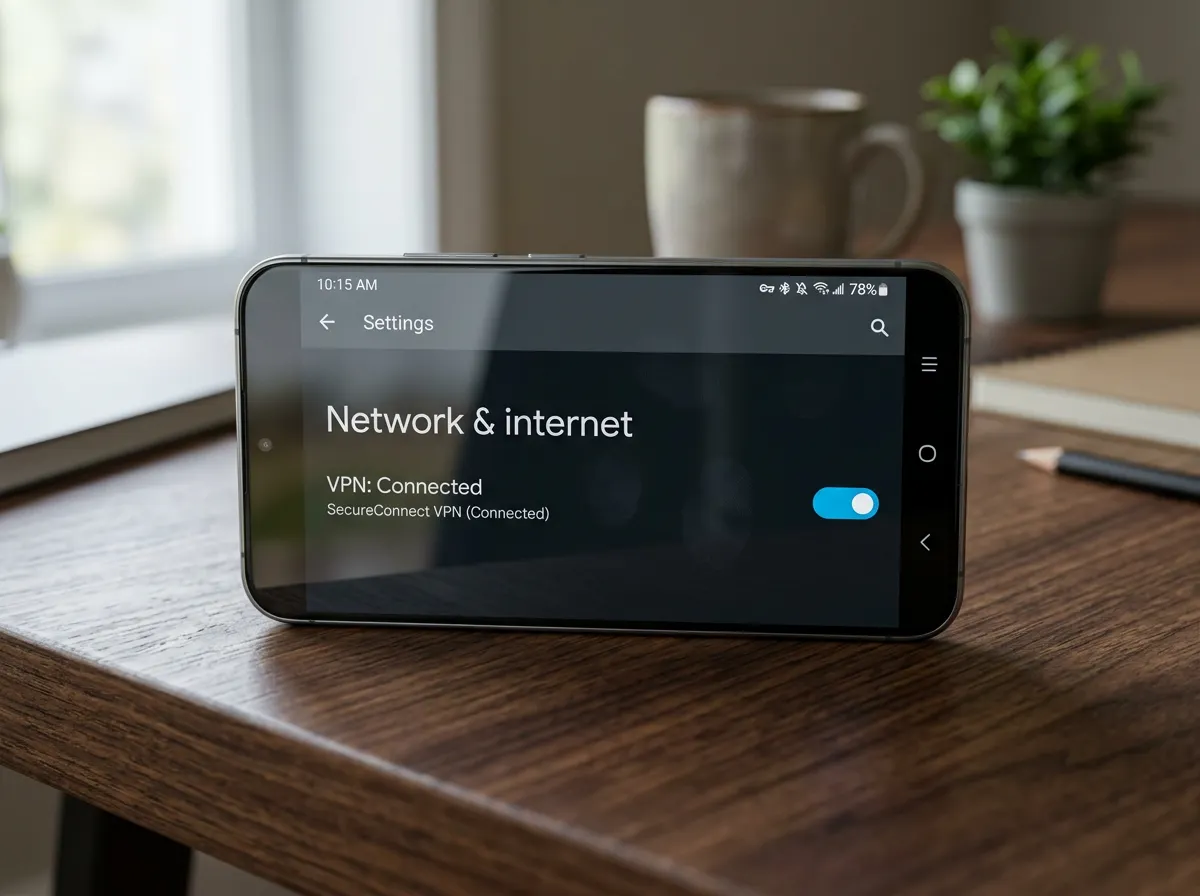
Following local regulations is key when using a VPN in China. Here’s what you need to know:
When to Use
- Backup: If your eSIM has spotty coverage (e.g., remote areas) and you can connect to public WiFi, a VPN keeps you linked to international apps.
- Physical SIM users: If your local SIM doesn’t have a built-in VPN, you’ll need one to use your favorite apps on the go.
How to Choose the Right VPN
- Use a reputable, law-compliant VPN for peace of mind.
- Avoid free VPNs—they’re unreliable and risk your personal data.
- Install the VPN before arriving in China—some services can’t be downloaded once you’re there.
Compliance Note
VPN usage is regulated in China. Only use VPNs for legitimate travel needs (staying in touch with family, work) and avoid illegal activities. Trip.com’s eSIMs with built-in VPN are fully compliant, making them the safest choice for your trip.
Read More on China Travel Tips





















[10% Off] Top Hotel Picks for Your China Getaway
Top Shanghai Hotels
Top Beijing Hotels
Top Guangzhou Hotels
See All Hotels
 NO.1
NO.1






















FAQs about China eSIM with VPN
-
Which is the best eSIM to use in China with VPN?
-
What are the disadvantages of using an eSIM when travelling in China?
-
Which eSIM comes with VPN?
-
Can foreign visitors buy a China eSIM with VPN after arriving in China?
-
Can I use a VPN with an eSIM in China?
-
Is a China eSIM with VPN worth it for a short trip to China?
Disclaimer: This article has been provided by an individual contributor or third party platform. If there is any discrepancy regarding the copyright, please contact us directly and we will delete the content immediately.

Trending Searches
-
Top-Rated Stays
-
eSIM/SIM card
-
Trip.com links
- Shanghai Hotels
- Guangzhou Hotels
- Shenzhen Hotels
- Beijing Hotels
- Hong Kong Hotels
- Tokyo Hotels
- Chongqing Hotels
- Chengdu Hotels
- Zhangjiajie Hotels
- Bangkok Hotels
- Toronto Hotels
- Seoul Hotels
- Osaka Hotels
- Xi'an Hotels
- Calgary Hotels
- Taipei Hotels
- Richmond Hotels
- Montreal Hotels
- Hangzhou Hotels
- Kyoto Hotels
- Trip Coins
- Trip.com VIP Lounge Access
- Trip.com Flight Change
- Trip.com E-Receipt
- Trip.com Seat Selection
- Trip.com Payment Methods
- Trip.com Membership
- Trip.com Check in
- Trip.com Reviews
- Trip.com Ticket Issued Status
- Trip.com Flight Ticket
- Trip.com Baggage Allowance
- Trip.com App
- Trip.com Booking Fee
- Trip.com Booking Change
- Trip.com Refund
- Trip.com Call Center
- Air Flexibility
- How to List your Property on Trip.com
- Trip.com Price Match