Trip.com Payment Methods: Easy Ways to Pay

By Trip.com
June 29, 2026
Trip.com offers a variety of payment methods to suit global customers' diverse preferences. Whether booking a flight, reserving a hotel, or planning a trip, understanding Trip.com's payment options can streamline the process.
Learn about each payment method, including credit/debit cards, PayPal, and other digital wallets, along with step-by-step instructions and helpful tips in this guide. 💰
Bangkok
Shanghai
Osaka
Seoul
See all flights


Trip.com Payment Method Availability Across Platforms
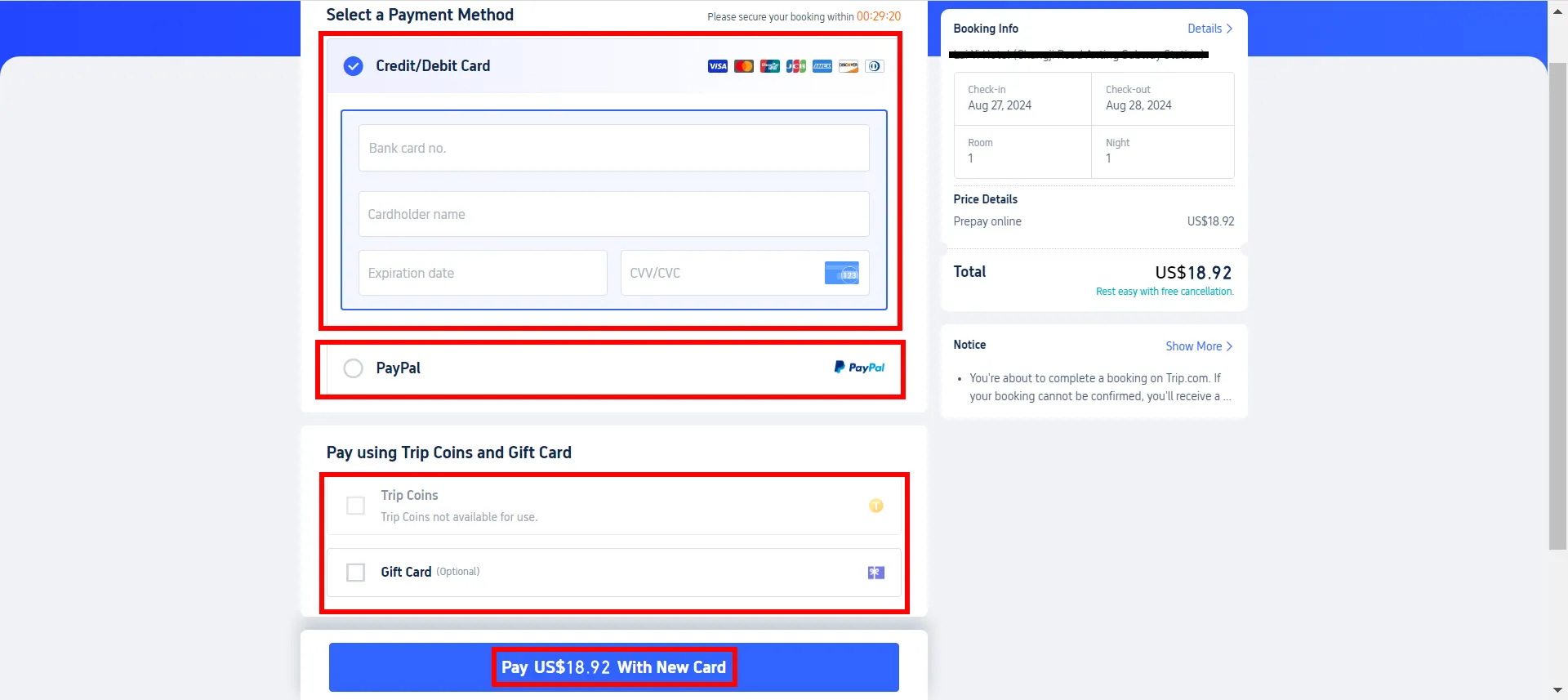
Payment Method | iOS | Android | Desktop Web | Mobile Web |
Credit Card & Debit Card | ✔️ | ✔️ | ✔️ | ✔️ |
✔️ | ✔️ | ✔️ | ✔️ | |
PayPal | ✔️ | ✔️ | ✔️ | ✔️ |
Google Pay | ❌ | ✔️ | ✔️ | ✔️ |
Apple Pay | ✔️ | ❌ | ❌ | ❌ |
Trip Coins | ✔️ | ✔️ | ✔️ | ✔️ |
Gift Card | ✔️ | ✔️ | ✔️ | ✔️ |
Trip.com Payment Method with Credit Card & Debit Card
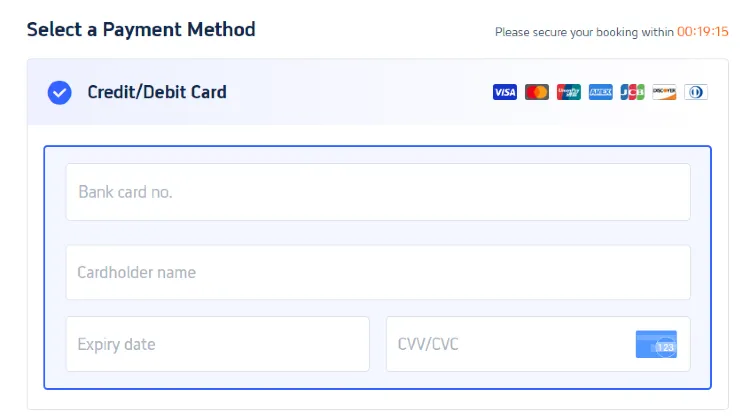
Using a credit or debit card is one of the easiest and safest ways to complete transactions on Trip.com. The platform accepts major credit and debit cards, including:
- Visa
- JCB
- MasterCard
- UnionPay
- American Express (Amex)
- Discover
- Diners Club International (can be used on Trip.com Website)

Instructions for Paying with a Credit/Debit Card
- Choose "Credit/Debit Card" as your payment method.
- Input the cardholder's name, card number, expiration date, and security code (CVV for Visa and MasterCard on the back, 4-digit code CID for American Express on the front).
- Review the payment details and submit.
Worldwide eSIM Selection
See all attractions
 659539 booked













Trip.com Payment Method: PayPal
PayPal is another safe and easy payment option, allowing you to complete transactions without having to enter detailed card information every time. This streamlined process helps protect your financial details and speeds up your checkout experience.
Instructions for Paying with PayPal
- Select PayPal as your payment option on the payment page.
- After that, you will be redirected to the PayPal login screen.
- Log in to your PayPal account and authorize the payment to complete the transaction.
Trip.com Payment Method: Google Pay

Google Pay offers a convenient payment solution for Android users, with the use of credit, debit, or prepaid cards stored in your Google account. This service simplifies the payment process, making transactions faster and safer by allowing you to pay directly from your phone without manually entering card details each time.
Instructions for Paying with Google Pay
- Add your preferred credit, debit, or prepaid card to Google Pay.
- On the Trip.com app's payment page, choose Google Pay as your payment method.
- Follow the on-screen instructions to finalize and complete your payment securely.
Car Rentals
Car Rental Promo Code - 8% Off
New User Enjoy up to 8% Off
TRIPCAR8
Trip.com Payment Method with Trip Coins
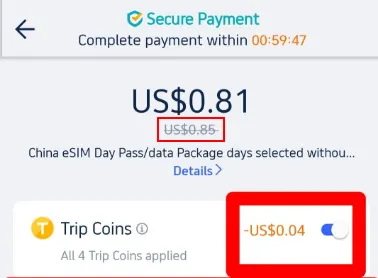
Trip Coins are rewards you earn as a Trip.com member. They are part of Trip.com’s loyalty program. You can earn these coins by booking hotels, flights, package deals, writing reviews, and sharing your travel experiences on Trip Moments. These Trip Coins can be used to save money on services such as hotels, flights, numerous local experiences, train tickets, airport transfers, and car rentals on Trip.com.🎁
Steps for Paying with Trip Coins
- Select a Service: Choose from hotels, flights, local experiences, or other available services on the Trip.com home page.
- Booking Process: After selecting your service, proceed to the payment page to continue with your booking.
- Apply Trip Coins: Opt to use Trip Coins before finalizing your payment. The system will show the discount you can get based on your available Trip Coins.
- Finalize Payment: Complete your booking with the adjusted total after adding the Trip Coins discount.
Learn how to collect and use Trip Coins now and discover more benefits of Trip Coins.
Trip Coin Value | Application |
100 Trip Coins = US$1 | Redeemable for a variety of services with no minimum threshold required. |
🎁How to Earn Trip Coins & Trip.com Membership Perks

Getting Trip Coins on Trip.com is straightforward and rewarding. Every booking you make—hotels, flights, trains, attractions, or airport transfers—earns you Trip Coins. Here’s how you can stack them up and save on future bookings:
Earn Coins with Every Booking
Trip Coins can be earned through several activities on Trip.com:
Activity | Platform |
Booking hotels | Web/Mobile Web/App |
Booking flights | Web/Mobile Web/App |
Writing hotel reviews | Web/Mobile Web/App |
Publishing Trip Moments | App |
Writing attraction reviews | Web/App |
Share and Earn
- Trip Moments: Simply post your travel stories and pics to earn more Trip Coins.
Note: You cannot earn Trip Coins for offline bookings, free bookings, or bookings partially covered by promotions.
Membership Perks: Travel More, Save More
Each booking not only brings you closer to your next adventure but also boosts your Trip Coins balance. As your membership tier increases from Silver to Black Diamond, so do your perks.
Membership Tier | Trip Coins Bonus | Upgrade Criteria |
|---|---|---|
Silver | Base rate | Register a Trip.com account |
Gold | +20% | Complete 1 eligible booking (flights, hotels, tours, etc.) |
Platinum | +50% | Complete 3 eligible bookings within 1 year after reaching Gold |
Diamond | +100% | Complete 8 eligible bookings (min. total spend: USD $1,000) within 1 year after reaching Platinum |
Diamond+ | +150% | Spend USD $10,000 within 1 year after reaching Diamond |
Black Diamond | +200% | Invitation-only: Spend USD $20,000 within 1 year after reaching Diamond+ and complete your member profile (via Account > Settings > Manage my account > Update member profile) |
Climb the Tiers: Trip.com Membership offers an impressive range of perks that enhance every trip you take: earn more Trip Coins, get exclusive hotel and flight discounts, enjoy VIP lounge access, and even score free top attraction tickets. Each membership level—Silver, Gold, Platinum, Diamond+, and Black Diamond, builds on these perks, giving travelers better rewards as they book more.
Trip.com Payment Method: Gift Cards
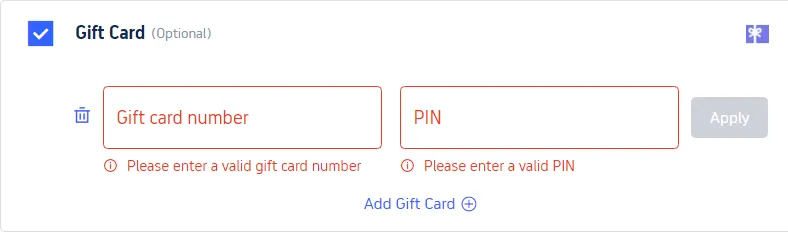
You can combine Trip.com gift cards with other payment methods if the balance is insufficient to cover the total booking amount. This means you can use your gift card with credit or debit cards, PayPal, or other payment options to complete your purchase.
Steps to Pay with Gift Cards
- Select the "Gift Card" option at the payment stage.
- Input the gift card number and PIN.
- If the balance on your gift card does not cover the total cost, you can pay the remaining balance with an additional payment method, credit/debit card or PayPal.
Easy Travel with Trip.com!

With 3+ bookings, travellers can enjoy benefits such as complimentary access to airport lounges, additional Trip coins, greater savings on hotel reservations, and reduced refund fees for train tickets.
Trip.com is an international online travel agency that offers 24/7 customer support in multiple languages to assist travellers with their needs. The platform aims to simplify the processes for booking flights, hotels, and a wide range of tours and activities to give you the best travel experience.
Book Global Top Hotels with Trip.com
See All Hotels









FAQs about Trip.com Payment Methods
-
Does Trip.com accept Alipay?
-
Does Trip.com let you pay in installments?
-
What payments does Trip.com accept?
Disclaimer: This article has been provided by an individual contributor or third party platform. If there is any discrepancy regarding the copyright, please contact us directly and we will delete the content immediately.
Trending Searches
-
Trip.com links
-
eSIM/SIM card
-
Air travel guide
- Trip.com Cancellation Policy
- Trip Coins
- Trip.com VIP Lounge Access
- Trip.com E-Receipt
- Trip.com Seat Selection
- Trip.com Customer Service
- Trip.com Payment Methods
- Trip.com Phone Number
- Trip.com Membership
- Trip.com Change Passport
- Trip.com Check in
- Trip.com Reviews
- Trip.com Ticket Issued Status
- Trip.com Baggage Allowance
- Trip.com Contact
- Trip.com Refund
- Air Flexibility
- How to List your Property on Trip.com
- Trip.com Pay Installments
- Trip.com Booking Confirmation