How to Use DiDi in China as a Foreigner? Setup, Pay & Ride


Planning a trip to China and wondering how to get around easily? Look no further than DiDi Chuxing—China’s dominant ride-hailing app. Whether you’re exploring Beijing’s hutongs, navigating Shanghai’s skyscrapers, or maneuvering in Chongqing for hot pots, DiDi simplifies your on-the-ground travel with practicality, affordability, and wide availability. Let’s break down everything you need to know to use DiDi like a local, from setup to safety and beyond.
To Shanghai
To Beijing
To Chongqing
See all flights



What Is DiDi App?

Think of DiDi as China’s version of Uber—but more integrated into local daily life. Founded in 2012, it’s now China’s leading ride-hailing platform covering over 400 cities nationwide. For Canadian travellers, DiDi checks all the boxes: it’s practical (available 24/7, even in suburban areas), affordable (often cheaper than taxis for daily trips), and widely accessible (works in big cities and smaller tourist spots alike).
Unlike other apps, it’s designed with foreign visitors in mind—offering English-language support, international payment options, and tools to bridge the language gap.
The English version lets you book cars, bikes, and even buses across most Chinese cities, with cashless payments via Visa/Mastercard or Alipay. It's good for stress-free travel, with real-time translations and upfront pricing.
DiDi vs. Taxis: Which Is Better for Foreign Visitors?
Choosing between DiDi and traditional street taxis comes down to your priorities—here’s a straight-up comparison to help you decide:
Comparison Aspect | DiDi | Traditional Street Taxis |
|---|---|---|
Cost |
|
|
Convenience |
|
|
Language Barriers |
|
|
Safety |
|
|
Verdict: DiDi is better for most Canadian travellers—unless you’re in a hurry and spot a taxi immediately, or prefer fixed fares with no surge pricing.
Step-by-Step Guide to Download and Set Up DiDi App
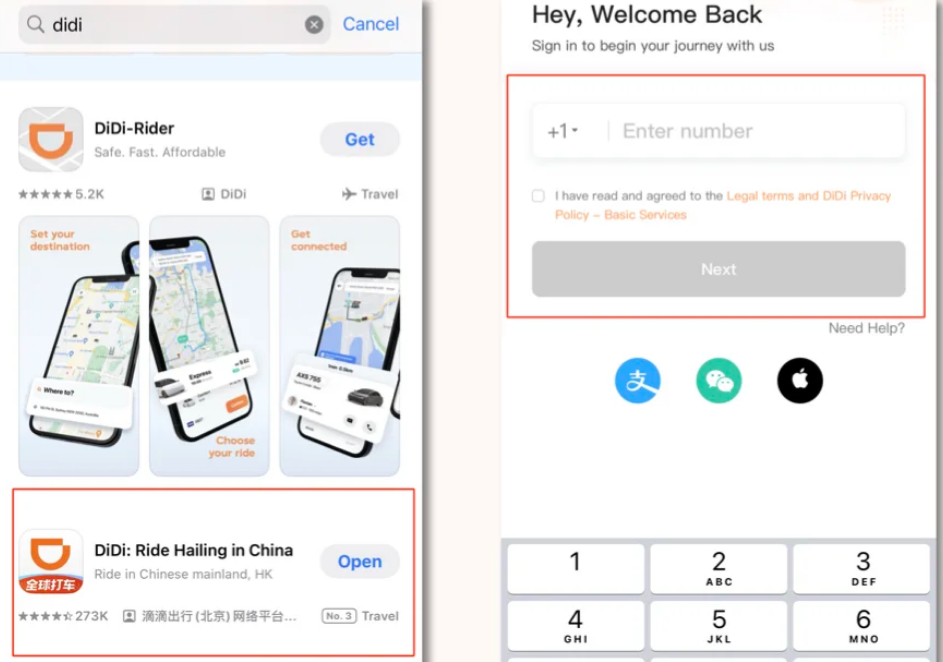
Setting up DiDi is easier than you think—follow these steps before or after arriving in China:
Download the App
For iOS, search “DiDi” or “滴滴出行” in the App Store. For Android, use DiDi’s official website (Google Play isn’t available in China).
Register an Account
You don’t need a local Chinese SIM card or phone number to use DiDi. Open the app, select your country code (+1 for Canada), enter your Canadian phone number, and verify with the SMS code sent to you. You can also register with your email if needed.
Set Up English Language
Go to “Settings” > “Language” and select “English.” The app will switch to English, but don’t worry—your destination will auto-translate to Chinese for drivers.
Complete Verification (If Needed)
Some features require identity verification—just upload a photo of your passport (a mandatory requirement for ride-hailing users in China).
Stay Connected in China With Trip.com!

China Mainland 5G eSIM | Three Networks Supported, ChatGPT & Google Maps Supported | 500MB/Day - 100GB Total | 1-60 Days | 24-Hour Billing | QR Code
4.5/5
9700 reviewsI used this in China. I've been to China several times before, but I used a slightly expensive eSIM. I often see ads for it on social media. However, this one seems to use the networks of three major Chinese telecommunications companies, so even if one doesn't work, there should be three that will work somewhere, and it's not expensive! So I decided to try it. There were some negative reviews, which made me a little worried. But the result was great. It connected immediately, and the data allowance was fine. It even worked fine at the Great Wall of China. I was very satisfied. Line, Google, and chatGPT all worked without any problems. I think I'll use this again next time.

Mainland China 5G eSIM | 3 Carriers · All AI & TikTok | 1–365 Days | QR Code
4.5/5
8647 reviewsGreat eSIM, with functional data sharing. WhatsApp, Facebook, Instagram, and Google worked normally. The IP address was from Singapore, which allowed Amazon (Kindle) to work perfectly, something my other eSIM, which used a Hong Kong IP address, didn't do. An important tip: as soon as I activated the eSIM, it fluctuated between 4G, but after restarting the phone, it stayed on 5G all the time. 500MB per day seems sufficient for those who will only use the internet without watching videos, or 1GB per day if watching a few videos. Don't forget to disable automatic app updates to avoid using up your data plan.

Mainland China/Hong Kong/Macau 5G eSIM | 5 Carriers | Day Pass/Total Data Package | 24-Hour Billing | QR Code
4.6/5
21970 reviewsEasy to buy and set up, this esim was mainly 5g with good speed but did tend to lose signal here and there

5G/4G eSIM in 8 Asian countries | Multi-network support, supports ChatGPT & Google Maps | 500MB/day - 50GB total | 1-30 days | 24-hour billing | QR code
4.6/5
6607 reviewsAn indispensable travel accessory. I took two SIM cards, traveled to China and Vietnam, and activated them literally immediately after landing. Everything worked reliably and without any issues. Nothing more to say.

Mainland China 5G eSIM | Day Pass/Total Data Package | ChatGPT Available | 24-Hour Billing | 1-365 Days | QR Code
4.6/5
66925 reviewsThe eSIM works perfectly, it's very easy and quick to install. Excellent signal all around, an excellent product.
Understanding Service Types on DiDi
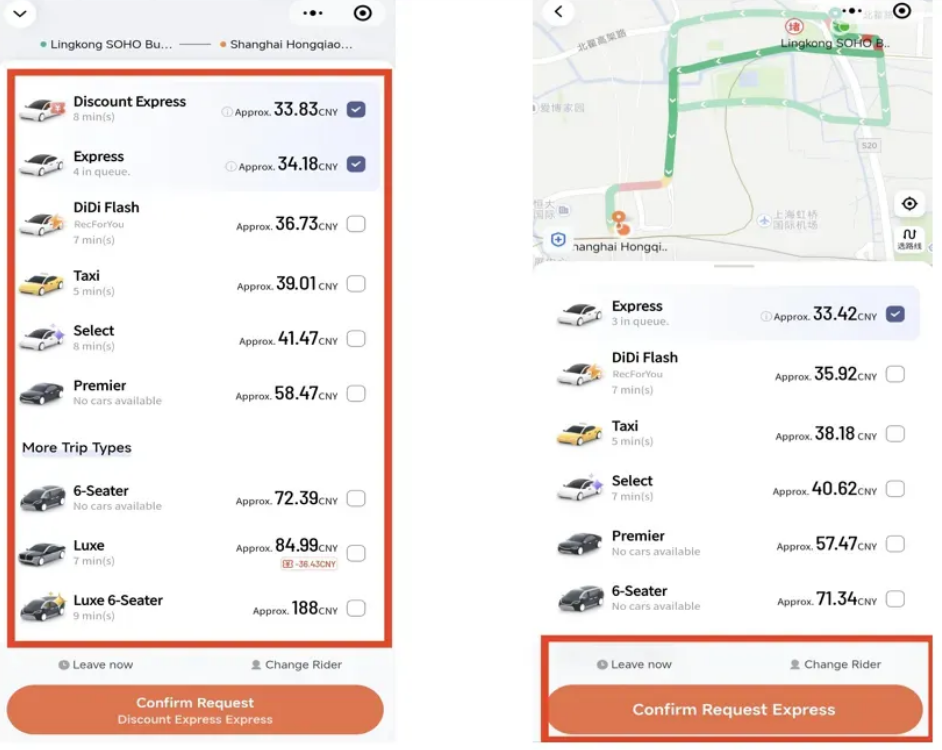
DiDi offers several ride types to fit your budget and needs—here’s what Canadian travellers need to know:
Express (快车)
The most popular option—affordable, reliable, and perfect for daily trips. It uses standard family cars, has a low base fare (10–15 yuan), and a short wait time (3–5 minutes in cities). (Please refer to the official website for the latest information.) This is your go-to for most outings.
- Express Pool (拼车)
Shared rides with other passengers going the same direction. It’s the cheapest option (15–25% cheaper than Express) but takes longer—great if you’re not in a hurry.
- Peak Hour Priority (高峰优先)
Faster pickup during peak hours or rain—slightly more expensive than Express but worth it if you’re in a rush.
Premier (专车)
A step up in comfort—spacious seats and professional drivers. It’s 50–80% more expensive than Express, but worth it for airport runs, business trips, or traveling with family (some drivers in major cities, such as Beijing and Shanghai, speak basic English).
Luxury/Business (豪华/商务)
Top-tier service with luxury cars (e.g., MPVs, premium sedans), uniformed drivers, and extras like water and phone chargers. It’s 2.5–3 times more expensive than Express—ideal for special occasions.
Step-by-Step to Book a Ride on DiDi App
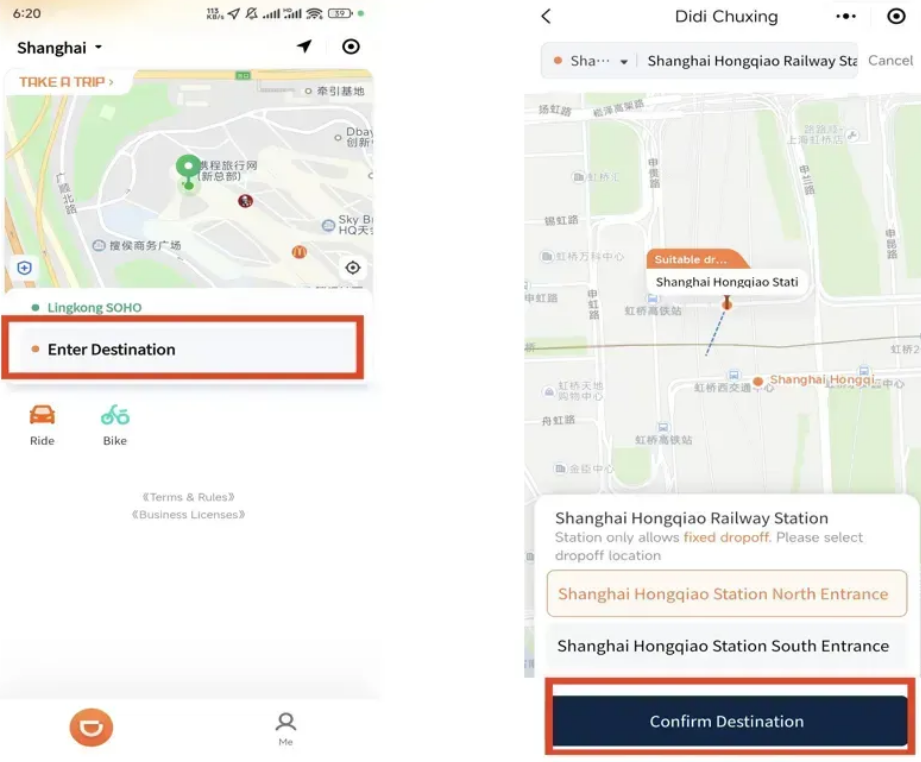
Booking your first DiDi ride is straightforward—follow these steps, and you’ll be on your way in minutes:
- Open the App or Mini-Program: Make sure your location is enabled (the app auto-detects your position via GPS).
- Enter Your Destination: Type it in English (e.g., “Forbidden City South Gate”) or Chinese—DiDi will auto-translate it for the driver. If the address is unclear, use a landmark (e.g., “near Starbucks, Xidan”).
- Choose Your Ride Type: Swipe to see options like Express, Premier, or Pool. Check the estimated fare and arrival time before choosing.
- Confirm Your Pickup Spot: Adjust the pin on the map if needed (make sure it’s a place where the driver can stop, like a curb or driveway).
- Tap “Confirm Ride”: You’ll see the driver’s name, car model, license plate, and real-time location—track their arrival on the map.
- Get Picked Up: Wait at the pickup spot, and double-check the license plate and car model to make sure it’s your driver. Once in the car, the driver may ask for the last few digits of your phone number to confirm that they picked up the right passenger.
- Pay Automatically: After the ride, the fare is deducted automatically from your linked payment method—no cash needed.
Note: When the driver arrives, show them the last 4 digits of your phone number (type them into your notes app beforehand, because some drivers don't understand numbers in English).
Amazing Tours in China!
See all attractions
 32795 booked







How to Pay for a DiDi Ride?
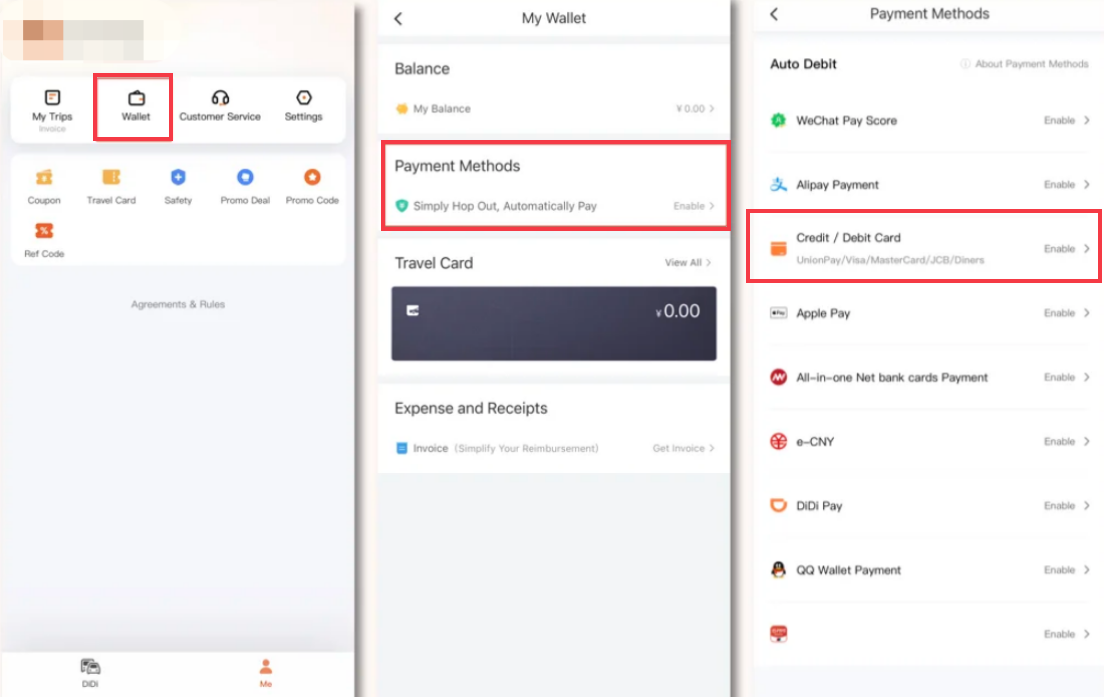
DiDi is cashless, but setting up payment is easy for Canadian travellers—here are the options:
Linking International Credit/Debit Cards
Link your Visa or Mastercard to the DiDi app (go to "Me" > "Wallet" > "Add Card"). DiDi charges a foreign card service fee of about 3% on transactions over ¥200. (Please refer to the official website for the latest information.) Notify your bank beforehand that you'll be using your card in China to avoid blocks.
WeChat Pay or Alipay
The most convenient option—link your WeChat Pay or Alipay to DiDi, and fares will be deducted automatically.
Cash (Rarely Used)
Some drivers may accept cash, but it’s not recommended—DiDi’s default is cashless, and most drivers prefer app payments.
How to Use DiDi via Alipay & WeChat?
If you don’t want to download a separate app (or save phone storage), use DiDi’s mini-programs directly in Alipay or WeChat—perfect if you already have them set up:
DiDi via WeChat
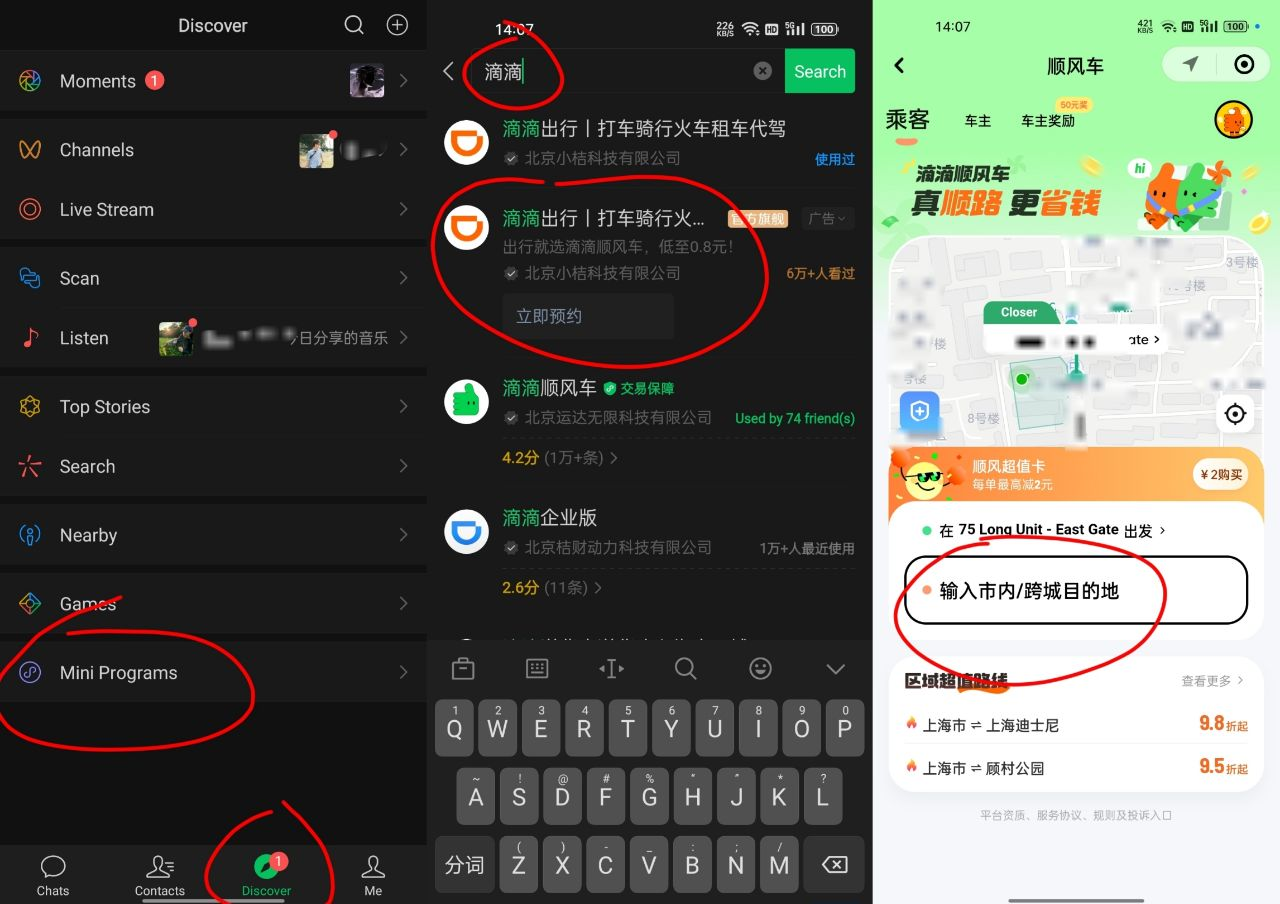
- Open WeChat and go to the “Discover” tab.
- Search for “滴滴出行” (copy and paste these characters if you can’t type Chinese).
- Tap the DiDi mini-program—you’ll be automatically logged in via your WeChat account, so no extra registration is needed.
- The mini-program works just like the standalone app: enter your destination, choose your ride type, and pay using WeChat Pay (no need to link a separate payment method).
DiDi via Alipay
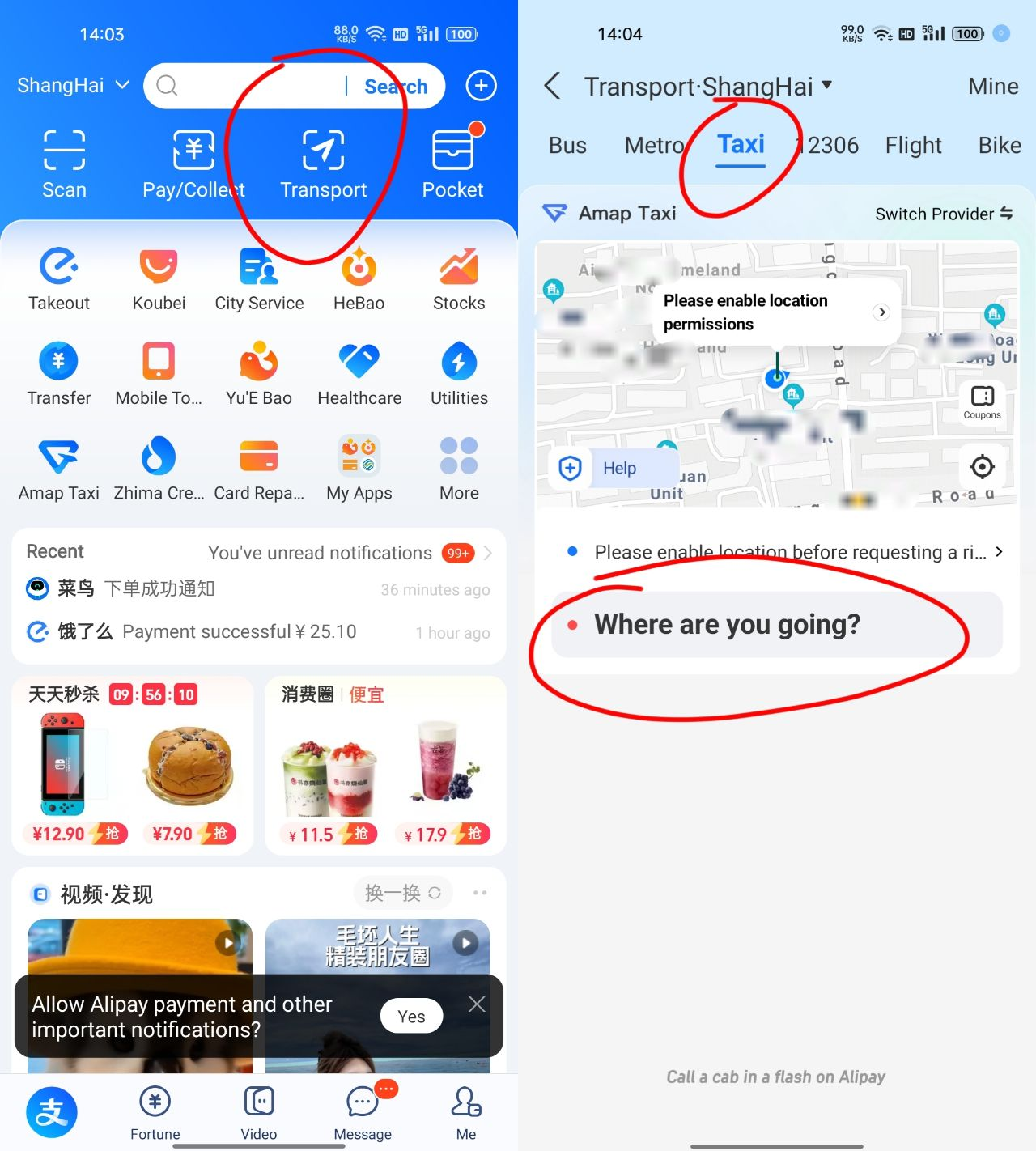
- Open Alipay → Tap “Transport” (look for the car icon).
- Choose “Taxi” → DiDi will pop up as a service.
- Same as the app: Enter pickup/destination, choose car type (Express/Premier), confirm.
- Payment is automatic through your Alipay balance or linked card. No extra setup needed!
DiDi Communication & Safety Tips for Foreign Travellers in China
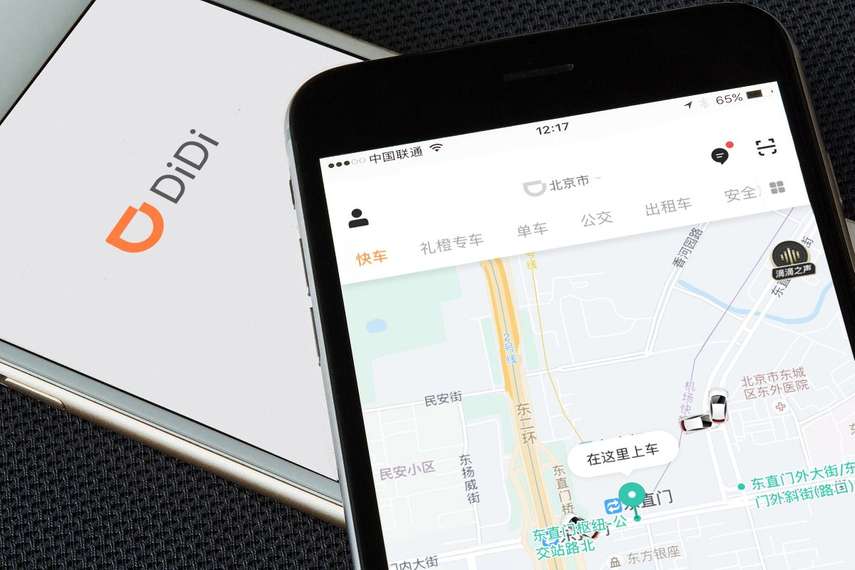
Language barriers are a common concern, but DiDi makes communication easy—here’s how:
- Built-in Auto-Translation: Your destination is automatically translated to Chinese for the driver, so they know exactly where to go—no need to speak Mandarin.
- In-App Chat Translation: If you need to message the driver (e.g.,“I’m wearing a blue backpack near the subway exit!” send a voice note if needed), use the app’s built-in translation tool—it converts your English to Chinese and vice versa.
- Landmarks and Photos: If the driver can’t find you, send a photo of your surroundings (e.g., a street sign or landmark) via the app—visuals are universal.
- Keep It Simple: If you do speak a little Mandarin, use basic phrases like “谢谢” (xiexie = thank you) or “这里” (zheli = here)—drivers will appreciate the effort!
Safety Checks
DiDi is safe for foreign travellers—here are a few tips to make your ride even more reassuring:
- Verify Your Driver: Always check that the driver’s name, car model, and license plate match the app before getting in—never get into a car that doesn’t match.
- Share Your Trip: Use the “Share Trip” feature to send your real-time location to friends or family—they’ll see where you are and when you arrive.
- Stick to Public Pickup Spots: Avoid getting picked up in isolated areas, especially at night. Choose well-lit, busy locations.
SOS Button
- Use the Emergency Button: The app has an emergency button (usually in the top-right corner) that connects you to local authorities—use it if you feel unsafe.
Lost & Found
- Keep Your Belongings Secure: Don’t leave valuables (e.g., passports, phones) visible—store them in a bag or pocket.
- Use the Lost Item feature in the app. Offer a small reward via chat—can speed things up sometimes. Call DiDi support at 400-000-0999 if you need further assistance.
Where to Use DiDi in China: Best Cities for Ride-Hailing
DiDi works in over 400 Chinese cities, but it’s most useful in these top tourist destinations for Canadian travellers:
Cities | Reason |
|---|---|
Beijing & Shanghai | The biggest cities, with 24/7 DiDi availability—perfect for navigating busy streets, airports, and tourist spots. |
Chengdu & Chongqing | Mountainous terrain and confusing street layouts make DiDi a lifesaver—great for getting to panda reserves and hotpot restaurants. |
Sanya & Lijiang | No metro systems, so DiDi is your main option for getting around these popular tourist cities. |
Using DiDi From Chinese Airports and Train Stations

Picking up a DiDi from airports or train stations can be confusing—but these tips will help you avoid delays and frustration:
- Go to the Official Ride-Hailing Zone: Most airports and train stations have dedicated “网约车” (ride-hailing) pickup areas—follow the signs or use the app’s in-app walking guide to find them.
- Adjust Your Pickup Pin: Don’t request a ride from inside the terminal—drag the pin to a curb or driveway where cars can stop (avoid pedestrian-only areas).
- Use the App’s Guidance: Many airports (e.g., Beijing Capital, Shanghai Pudong) have DiDi’s in-app photo or video guides to help you find the pickup spot. Some even show your driver’s parking spot number.
- Book in Advance: For airport arrivals, book your DiDi while you’re still on the plane (if you have Wi-Fi) to avoid long waits during peak hours. Enter your flight number, and the driver will wait if your flight is delayed.
- Look for DiDi Guides: Some major hubs may have DiDi volunteers during peak hours to help you find the pickup area or book your ride.
How to Solve Common Problems When Using DiDi in China
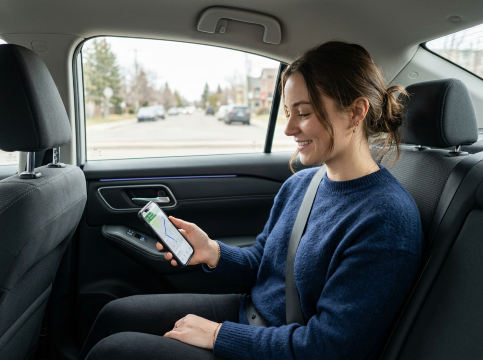
Even with the best planning, you might run into issues—here’s how to fix the most common ones:
- Driver Can’t Find You: Send a photo of your surroundings via the app, or move to a more visible landmark (e.g., a big sign or statue). Use the in-app chat to tell the driver your location in simple terms.
- Payment Failed: Check if your card is blocked (notify your bank beforehand) or if your WeChat Pay/Alipay has enough funds. Try linking a different card or reloading your wallet.
- Surge Pricing Is Too High: Wait 10–15 minutes for surge pricing to drop, or switch to Express Pool for a cheaper option. Alternatively, take a taxi if one is available.
- Wrong Destination: Double-check the address before confirming your ride—if you make a mistake, message the driver immediately (use translation) or cancel the ride (no fee if done within 1 minute).
- No Internet: Download offline maps in advance, or use the hotel’s Wi-Fi to book your ride before heading out. Some DiDi drivers can share their hotspot if needed.
Final Tip
DiDi is your best friend for flexible, convenient travel in China—but don’t be afraid to mix it up with other transport options to save money and experience more of the country. With this guide, you’ll be navigating China like a pro in no time!
[5% Off] Must-Visit Attractions in China
Check some of the top attractions in China below!👀






*Prices are approximate and vary by season, availability, and ticket type. All prices in CNY.
[10% Off] Best China Hotel Recommendations
Top Hotels in China
Top Shanghai Hotels
Top Beijing Hotels
Top Chongqing Hotels
See All Hotels



























FAQs about DiDi App
-
Can a foreigner use DiDi in China?
-
Do I need a China number to use DiDi?
-
How do I pay with DiDi app in China?
-
Does DiDi work everywhere in China?
-
Is it safe to use DiDi?
Disclaimer: This article has been provided by an individual contributor or third party platform. If there is any discrepancy regarding the copyright, please contact us directly and we will delete the content immediately.

Trending Searches
-
Air travel guide
-
Latest Flight Deals
-
eSIM/SIM card