Complete Guide to Using Amap in China for Canadians


When you travel to a new country, getting around is really important. Amap (full Chinese name is “Gaode Map” 高德地图 – international version is AMap Global) is one of the most popular navigation apps in China. It doesn’t just help you find your way but also helps with all kinds of travel stuff, like finding dinning places, taking buses, or getting a taxi. This guide tells you everything you need to know: from installation to explaining all its features. Just follow the steps, and you’ll learn how to use it in no time!
To Beijing
To Shanghai
To Chongqing
See all flights


How to Download & Install (AMap Global vs Gaode Map)
AMap Global and Gaode Map are different when it comes to where you download them and what you need to install them. Both versions are easy to download, but make sure you pick the one that works for you. The steps are simple – no hard stuff needed.
AMap Global (International Version)
This one’s good for foreign visitors. If you have an iPhone, open the App Store (you need to switch to a region that’s not China) and search for “AMap Global” straight away – don’t look for the regular “Amap”. If you have an Android phone, open Google Play and search for “AMap Global” to download and install it – again, don’t get the regular “Amap”. You don’t need a Chinese phone number to use all its main features. It’s really easy to use, perfect for foreigners.
Gaode Map (Domestic Version)
This one’s mostly for Chinese people. If you have an iPhone, you need to switch your App Store to China to download it. If you have an Android phone, you have to get it from Chinese app stores (like Huawei AppGallery or Xiaomi App Store). Usually, you need to link a Chinese phone number to use all its features – foreign phone numbers won’t work here.
Location Permission
When you open either app, your phone will ask if you let it “access your location” – click “Allow” so the navigation works right. Gaode Map might ask for more permissions (like looking at your contacts). But AMap Global only needs basic location access – it won’t ask for extra personal info that you don’t want to give.
Stay Connected With Trip.com!
See all attractions
 2036594 booked



How to Switch Languages (Only AMap Global)
A lot of Canadians worry about not understanding the Chinese interface. Here’s a big tip: only AMap Global lets you switch to other languages. Gaode Map doesn’t have this feature – it only shows Chinese. Luckily, AMap Global supports 14 languages, and switching is super easy. It only takes 3 simple steps.
Operation Steps (AMap Global)
Before you switch languages, remember two important things: First, check your app store region (iPhones need a non-Chinese region; Google Play on Android doesn’t have any region limits). Second, search for and download the app called “AMap Global” – don’t download the regular “Amap”.
1. Find “Settings” on the top right corner (the icon looks like a gear).
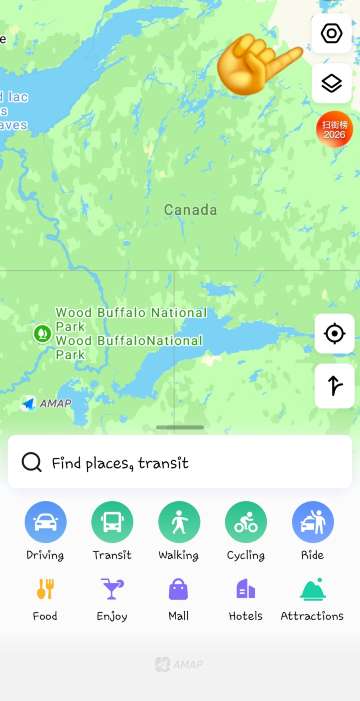
2. Tap into "General" option, the second tab on the list.
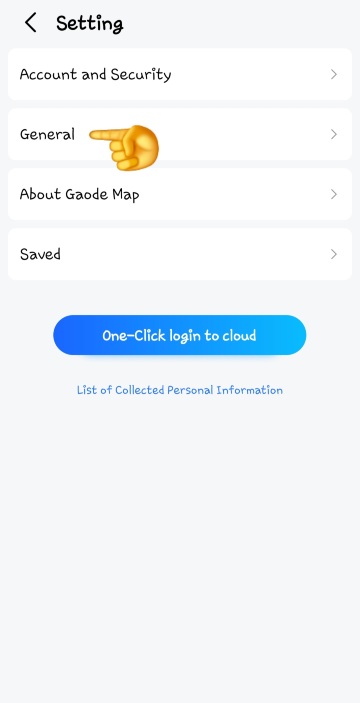
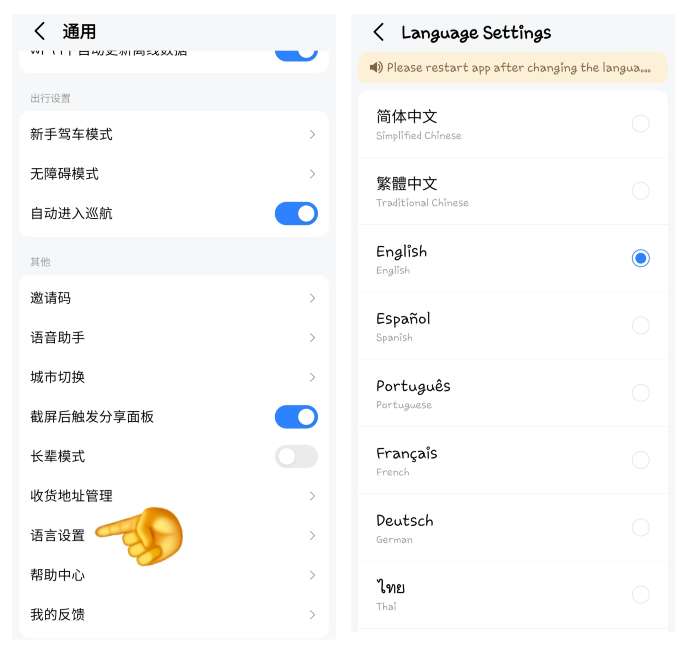
3. Find the “Language Settings” option at the very bottom of list, tap it, and pick the language you need.
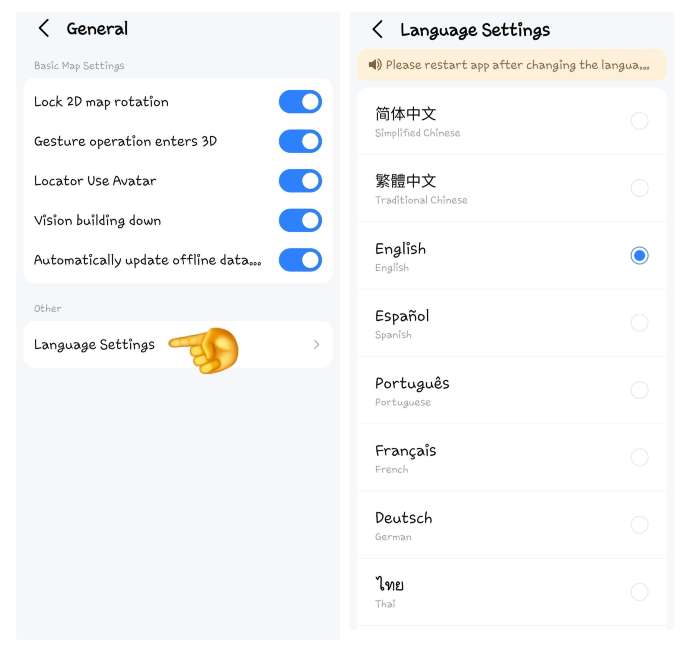
Wait about 10 seconds, and the whole app will switch to the selected language. All the feature names and prompts will be in the language you need – no need to stress about not understanding anything.
If you were curious and switched to the Chinese interface, you would notice that it looks quite different from the interface of other languages. But don't panic! Here's how to navigate back to the language options:
- Look for the little person icon on the bottom right corner.
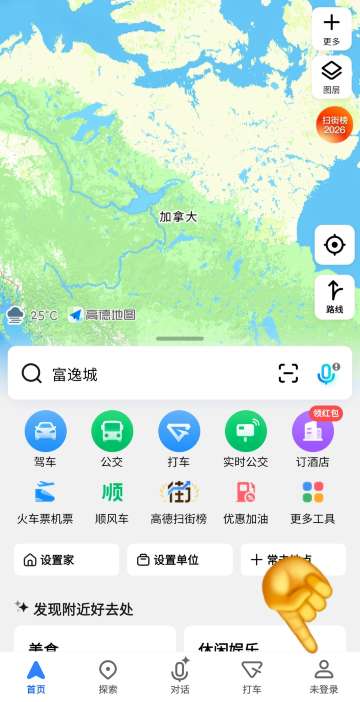
- Find “Settings” on the top right corner (the icon looks like a gear).

- Counting from top-down, the 7th tab on the list is the "General" option.
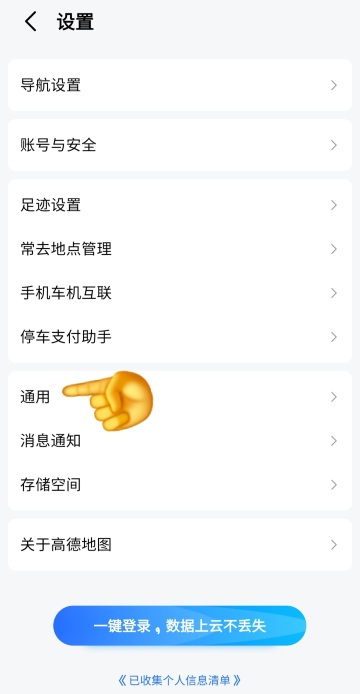
- Scroll all the way down on the page, counting from bottom-up, the 3rd tab would be the "Language Settings" option.
Gaode Map Limitation
It doesn’t let you switch languages – it only shows the Chinese interface. All the operation prompts, feature names, and menus are in Chinese. It can recognize simple English addresses, but it doesn’t have an English interface or English prompts. So it’s still hard for foreigners to use.
Address Input
AMap Global fully supports English addresses. You can type English place names straight in (like “Hongqiao Airport” or “The Forbidden City”), and the app will automatically know what you mean – it’ll show you the right place and the way to get there.
Gaode Map only shows Chinese, but it can recognize simple English addresses and show you the results in Chinese. You don’t have to translate English place names into Chinese first – it’ll do the work for you.
Car Rentals
Car Rental Promo Code - 8% Off
New User Enjoy up to 8% Off
TRIPCAR8
Key Feature: Navigation (AMap Global vs Gaode Map)
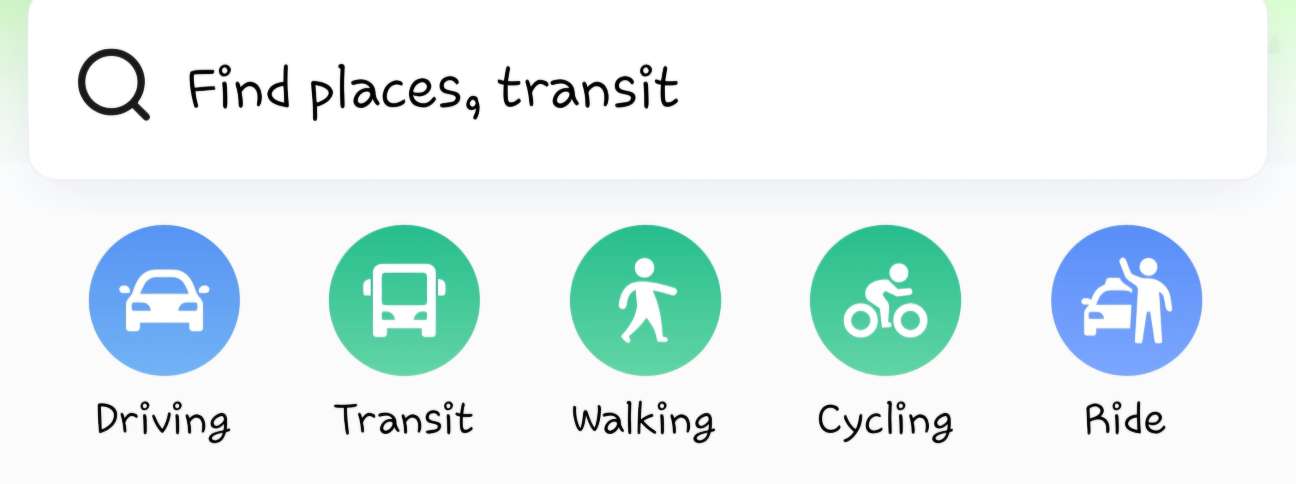
Navigation is the most used feature for both apps, but there are some small differences. Both support 5 ways to travel: walking, transit, cycling taxi, and driving. They work in all cities in China. But AMap Global is better for foreigners, while Gaode Map fits Chinese people’s habits more.
Walking Navigation
This mode is great for short trips, like going from your hotel to a nearby restaurant or scenic spot. Click “Routes” at the bottom of the map. Your current location is the starting point by default. Type where you want to go in the destination bar (both English and Chinese work), then pick “Walking”. The map will show you a detailed route and tell you directions out loud. It’ll remind you when to turn, where to cross the road, and even tell you about traffic lights – so you won’t get lost.
Bus/Subway Navigation
Buses and subways in China are really easy to use and cheap – lots of people take them when they travel. Pick the “Bus/Subway” option, type your start and end points. The map will show you all the possible routes, clearly mark where you get on and off, and tell you when the next bus or subway is coming (like “The bus will be here in 3 minutes”). That way, you don’t have to wait too long at the station. If you need to change buses or subways, it’ll show you exactly how to do it – like “Take Line 2 to People’s Square Station, then switch to Line 1”.
Cycling Navigation
This mode is perfect for short trips around the city, like going to a nearby park or shop, and skipping the traffic during rush hours. Click “Routes” and select “Cycling”. The map will show you safe bike/motor bike lanes and the shortest route.
Taxi Navigation
AMap Global works with international payment apps (like the international version of Alipay and WeChat). The exchange rate is calculated automatically, so you don’t need to exchange RMB cash. Also, its “Fare Protector” feature is better for foreigners – it helps you spot if the driver is charging too much or taking a longer way than needed, so you don’t get ripped off.
Gaode Map only works with Chinese payment apps (domestic Alipay, WeChat Pay, or UnionPay). You can’t link foreign bank cards or international payment apps, and there are no English prompts for getting a taxi.
Driving Navigation
Both apps can plan routes and tell you about traffic. Gaode Map gives more detailed info about Chinese traffic rules (like lanes for electric bikes or shared bikes) and more small local roads. AMap Global has English voice navigation, and it tells foreign drivers more useful stuff – like remembering to use your international driver’s licence. But it doesn’t tell you about some special Chinese traffic signs.
Practical Functions (AMap Global vs Gaode Map)

Besides navigation, Amap has lots of useful features. But there are big differences between the two versions. AMap Global is made for foreigners, while Gaode Map focuses on what Chinese users need. All the features are simple to learn, but make sure you know the differences between the two apps.
AMap Global | Gaode Map | |
Food & Scenic Spots |
|
|
Offline Maps |
|
|
Find Parking Lots and Gas Stations |
| |
Emergency Features |
|
|
Amazing Tours in China!
See all attractions








Final Useful Tips (AMap Global vs Gaode Map)
Enter Accurate Addresses
When you type where you want to go, try to enter the full name (like the full name of a hotel or scenic spot). Don’t use vague addresses – that way, the navigation will be more accurate.
Offline Maps in Advance
If you’re going to remote areas with poor connection or no signal, it’s a good idea to download offline maps beforehand. That way, you can still use navigation even without internet.
Traffic Rules
Both apps remind you of traffic rules. But Gaode Map only gives reminders in Chinese, while AMap Global gives them in English – like “Drive on the right” or “Cross the road at the crosswalk”.
Payment Preparation
When you use AMap Global, link up Alipay International or WeChat International beforehand. That way, you can use features like getting a taxi or unlocking shared bikes.
When you use Gaode Map, you need a Chinese phone number and a domestic payment account. It’s not good for foreigners.
Customer Service
AMap Global has English customer service 24 hours a day, 7 days a week. They can help you fix any problems you have with the app.
Gaode Map only has Chinese customer service, and they don’t speak other languages. If you don’t understand Chinese, you won’t get the help you need.
All in all, AMap Global is your best bet for getting around China. It has an English interface, lets you type in English, and works with international payments – it’s made just for foreigners. Gaode Map is better for Chinese people, but it has lots of rules that make it hard for foreigners (like only Chinese interface, needing a Chinese phone number, etc.). After you download and install AMap Global and switch it to English, you can use all its features easily – like navigation, getting taxis, and finding food. It’s simple to use and has everything you need. Whether you’re traveling for a short time or staying for a long while, it can help with all your travel problems. I hope this guide helps you out, and have a great, smooth trip in China!
Book Discounted Top Hotels in China!
Top Beijing Hotels
Top Shanghai Hotels
Top Chongqing Hotels
See All Hotels























FAQs about Amap in General
-
Can foreigners use Gaode map?
-
Is AMap owned by Alibaba?
-
Which map to use in China for foreigners?
-
Which apps don't work in China?
-
Is it illegal for a foreigner to use a VPN in China?
Disclaimer: This article has been provided by an individual contributor or third party platform. If there is any discrepancy regarding the copyright, please contact us directly and we will delete the content immediately.
Trending Searches
-
Air travel guide
-
Latest Flight Deals
-
eSIM/SIM card