Travel Smart with Japan eSIM: Plans, Set Up, and Troubleshooting Tips

When traveling to Japan, staying connected is a must. You’ll need it to get around busy cities like Tokyo and Osaka, use translation apps, book trains or hotels, and share photos with family and friends back home. This guide breaks down everything you need to know about Japan eSIMs from checking phone compatibility, picking plans, setting up, to common troubleshooting, so that you can stay connected without paying crazy roaming fees or dealing with extra hassle.
Popular Japan eSIM Plans
Japan 5G eSIM
- CoverageJapan
- Data0.5G-100GB/day or 1-50GB Total
- Validity1 to 30 Days
- PriceFrom CAD 0.17
Japan SoftBank 5G eSIM
- CoverageJapan
- Data0.5G-10GB/day ; 3-50GB Total
- Validity1 to 90 Days
- PriceFrom CAD 0.40

Japan au KDDI 5G eSIM
- CoverageJapan
- DataUnlimited;12GB;21GB;30GB
- Validity3 to 30 Days
- PriceFrom CAD 6.20
What Is a Japan eSIM, and Why Should We Use One?
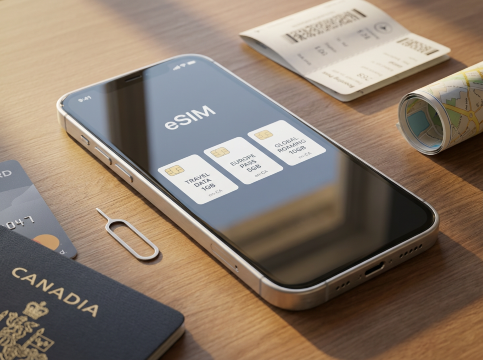
An eSIM (short for embedded SIM) is a tiny chip in your phone—no plastic card needed. Just download a digital plan from a Japanese or international provider to get data, calls, or texts. This means you can keep your regular phone number while using a Japan eSIM for data and calls. No lost SIMs or swapping hassle—plus, eSIMs are cheaper than Canadian carriers’ $15+/day roaming plans. eSIMs are fast, convenient, and perfect for international travel, where swapping physical SIMs or paying high roaming fees is a thing of the past.
Check If Your Phone Can Use It
There are two basic requirements for using eSIM. First, your phone must support eSIM. Most common phones released after 2019 can use it, such as new models of Apple, Samsung and Google phones. Second, your phone must not be locked by Canadian carriers. If you use services from carriers like Bell, Rogers or Telus, you can unlock your phone for free in advance. Locked phones cannot use foreign eSIMs, so check in advance to avoid wasting money.
To Tokyo
To Osaka
To Okinawa
See all flights


What eSIM Plan to Choose in Japan?
Okay so, once you know your phone works, you need to pick a plan. There are two types — local Japanese carriers (reliable) and international providers (flexible).
Japan Local Carrier eSIMs
Japan’s top local carriers (NTT Docomo, KDDI/au, SoftBank) have tourist eSIMs with the best coverage—even in rural areas like Hokkaido and Okinawa. However, most local plans are data-only. Use WhatsApp, FaceTime, or Skype for calls—it’s cheaper than adding voice service.
Carrier | Plan Details (~ CAD) | Key Features |
|---|---|---|
NTT Docomo | 7 days (10GB): CAD 40 / 14 days (20GB): CAD 70 / 30 days (30GB): CAD 100 | 5G connectivity for fast streaming and app usage |
KDDI (au) | 7 days (8GB): CAD 38 / 14 days (16GB): CAD 66 / 30 days (25GB): CAD 96 | Some plans include free Wi-Fi hotspot access nationwide |
SoftBank | 7 days (10GB): CAD 39 / 14 days (20GB): CAD 69 / 30 days (30GB): CAD 99 | Strong network coverage in urban areas (Tokyo, Osaka) |
Trip.com eSIM
Trip.com eSIMs partners directly with these top local carriers to offer official plans at discounted rates, and you can easily compare all options side-by-side on the platform—no need to visit multiple carrier websites. There are many highly customizable eSIM package options on the platform, ranging from 1 day to 30 days. The mobile data ranges from 500MB per day to 50GB in total. You can choose flexibly according to your travel days. The prices are very affordable, with a minimum of only ~ CAD 0.17 per day. After ordering on trip.com, you can set it up in a few minutes by following the prompts.
Trip.com eSIM Lets You: | ||
✔ High-Speed, Generous Data (5G) | ✔ Keep Your Original Phone Number | ✔ Instant Activation |
With Trip.com's eSIM, access high-speed 5G data wherever available. Stay connected with generous data allowances, perfect for streaming, browsing, and working on the go. | Maintain your original phone number while traveling. eSIM allows you to stay reachable on your primary number, ensuring you never miss an important call. | Activate your eSIM immediately upon purchase and start using data right away after you land. No need to visit a store or wait for delivery. |
✔ No Contracts, 100% Prepaid | ✔ Flexible Plan Options | ✔ Affordable & Clear Pricing |
Our eSIM plans are 100% prepaid with no long-term contracts. Enjoy the freedom to choose and change your plan without any hidden fees or commitments. | Choose from a wide variety of data plans and durations that suit your travel needs. Whether you need data for a few days or an entire month, Trip.com has you covered. | Save on roaming charges with Trip.com's competitively priced eSIM plans. Enjoy clear and straightforward pricing with no surprise fees |
Japan 5G eSIM | Supports Google Maps / ChatGPT | Daily/Total Data Plans | 24-Hour Billing | 1–30 Days | QR Code
4.5/5
11478 reviewsThis is our second time using this package. The speed is fine, as advertised. It works both in Honshu and the Okinawa Islands.

Japan SoftBank 5G Local eSIM | Japan IP • All AI & TikTok | Day Pass/Total Data Package | 24-Hour Billing | QR Code
4.7/5
11680 reviewsQuick and efficient, was able to get my internet going as soon as I arrived in Japan with no complications at all! Definitely would recommend. Internet speed was also very fast.

5G/4G eSIM in 8 Asian countries | Multi-network support, supports ChatGPT & Google Maps | 500MB/day - 50GB total | 1-30 days | 24-hour billing | QR code
4.6/5
6184 reviewsSuper SIM card, quick installation and the internet works great in China on high-speed trains, in Vietnam, and even upon arrival in Indonesia!

Japan au KDDI 5G eSIM | Local IP · supports all AI & TikTok | 100GB/day | Calendar day billing | QR code
4.6/5
1068 reviewsFor independent travelers looking for high cost-performance and primarily using the device for map navigation, posting Stories, and messaging, this is highly recommended! However, if you're a heavy binge-watcher, frequently make video calls, or are a business traveler with extremely high internet speed requirements, you might want to reconsider. I would definitely repurchase it next time I travel to another country.

Japan docomo Native 5G eSIM | Supports Google Maps / TikTok / ChatGPT | Daily / Total Data Plan | 1–30 Days | Calendar Day Billing | QR Code
4.6/5
3223 reviewsThis was my first time using Trip.com's eSIM in Japan, and I was extremely satisfied with the overall experience! I received the QR code very quickly after ordering, scanned it before departure to set it up, and upon arrival at the Japanese airport, I instantly connected to the internet as soon as I turned off airplane mode.
The internet speed was consistently stable throughout the trip. Whether using Google Maps for navigation, checking bus schedules, or posting Stories at tourist attractions, everything was smooth and seamless. The best part is that I didn't need to change to a physical SIM card or carry a bulky Wi-Fi device, and the price was much more affordable than traditional roaming. I highly recommend it to anyone planning a trip to Japan!
Other International eSIMs
Provider | Plan Details (CAD) | Key Features |
|---|---|---|
Airalo | 1GB (7 days): CAD 4.50 / 5GB (14 days): CAD 12 / 10GB (30 days): CAD 39 / Unlimited data (7 days): CAD 25 | Data-only, supports tethering (hotspot) for travel companions |
Holafly | Unlimited data: 3 days (CAD 19), 7 days (CAD 34), 30 days (CAD 59), 60 days (CAD 89) | Ideal for data-heavy use, offers multi-country plans |
Nomad | 5GB (14 days): CAD15 / 10GB (30 days): CAD 25 / 20GB (30 days): CAD 45 / Unlimited data (14 days): CAD 35 | Balances value and flexibility, includes 5G access in major Japanese cities |
Ubigi | 10GB (30 days): CAD 30 / 20GB (30 days): CAD 45 / 50GB (30 days): CAD 75 | Great for long stays, offers monthly recurring plans for stays of 3+ months |
Common Problems When Activating Japan eSIM
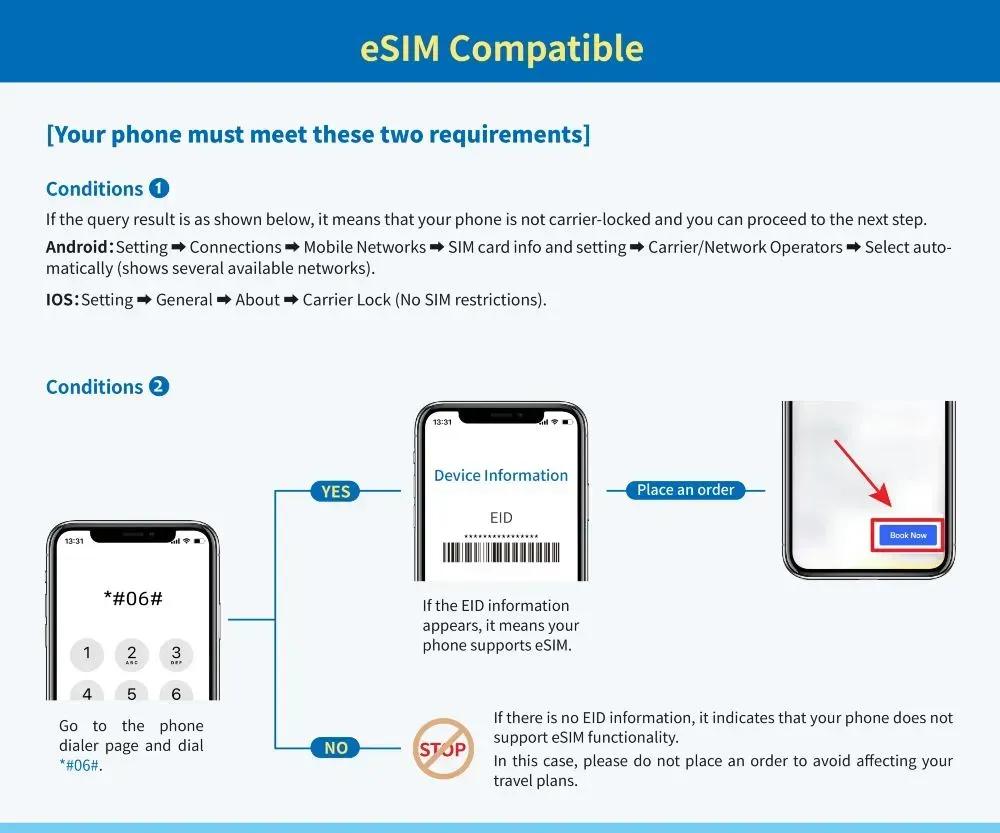
Check Your Phone's Compatibility
- iPhone users: Settings > General > About > Look for "Carrier Lock"
- Android uesrs: Settings > Connections > Mobile Networks > Carriers
Quick trick: Dial #06# - if you see an EID number, you're good to go!
Activating eSIM in Japan is very easy. You don’t need any special skills. Just follow these simple steps, and you will have internet soon.
- Save the QR code well. You get it from your email or the airport counter. Don’t lose it, because you need it to get internet.
- Wait until you arrive in Japan to turn it on. Connect to the free WiFi at the airport first. Don’t activate it in Canada. If you do, you might pay extra for roaming bills.
- Open your phone’s Settings. Find “Cellular” and tap “Add eSIM”. Use your phone to scan the QR code. Follow the steps on the screen and wait for 1 or 2 minutes.
- That’s all! You have internet now. Most major providers also offer 24/7 English support if you make a mistake.
Most eSIM providers have an online page or app. You can check how much data you use there, continue using your plan, or ask for help. You can also keep your Canada phone number for making calls and use the Japan eSIM for data.

JR Pass - All Japan 7/14/21 Days Rail Pass
Unlimited rides
EMS free shipping
Fixing Common eSIM Problems
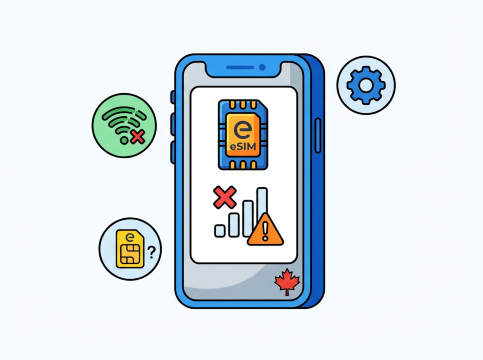
If your eSIM doesn’t work, don’t panic. Try these simple fixes first:
- Can’t activate it?: First, you can try connecting to Wi-Fi. If the QR code doesn’t work, use the activation code in your email. If you bought the eSIM from a provider, the activation code is also in their app.
- No data or slow data?: Restart your phone. Most of the time, we say: “Restart it when it’s broken.” It’s not 100% effective, but it can solve 99% of the problems. Check if your plan is active, and make sure it’s connected to the major Japanese telecom companies we mentioned earlier. Ensure your phone has 5G or 4G signal. If it’s still slow, try switching networks, or turn airplane mode on and then off—it’s similar to the principle of restarting.
- Lost the QR code?: You can try looking for it in your email, or in the provider’s app—you can find it under your order history.
Japan eSIM Important Tips
Be sure to remember these tips to avoid mistakes:
- Turn off data roaming on your Canada SIM. If you accidentally forget to turn it off and use it, roaming fees will cost you a lot of money. But don’t worry too much—most eSIM providers will send a text message to your phone to remind you that your data is being used. Remember to pay attention to the text reminders.
- Download offline maps before you leave Canada. If you lose data by any chance, you can still find your way and don’t need to panic.
- If you’re going on a trip with friends, check if your plan allows hotspot data (which can be used to share data with your partners) before buying it. Most providers clearly mark which plans allow hotspots, so you can check first.
- Save your QR code in your email or cloud storage so it’s easy to take. Back up your files for unexpected needs.
- Activate your plan when you arrive in Japan. Most plans are calculated by hours, starting from the time activated counting 24 hrs = a day. So activating it too early will waste hours of the plan—and that’s a waste of money, so remember this.
Japan eSIM Final Thoughts

A Japan eSIM is the easiest and cheapest way for foreigners to stay connected. First, use the eSIM provider’s tool to check if your phone can use this eSIM. Choose a plan—most providers have all good options, so you don’t need to look elsewhere. Set it up and you won’t have trouble with physical SIM cards, nor have to pay super high roaming feesh
Whether you’re visiting Tokyo, hiking the Japanese Alps, or relaxing in Okinawa, your eSIM will keep you connected—you don’t have to worry of losing contact. Booking through a reliable platform is very convenient; everything is in one place, just like a big supermarket that can meet all your needs. Wish you a happy trip to Japan and happy connectivity. Japan is a great country for traveling, and having data will make your trip better. Friends, have fun!
[10% Off] Top Hotel Picks for Your Japan Adventure
Top Tokyo Hotels
Top Osaka Hotels
Top Kyoto Hotels
See All Hotels
 NO.1
NO.1





















Frequently Asked Questions about Japan eSIMs
-
Can I buy a SIM card in 7-Eleven Japan?
-
Can I download the eSIM profile on different devices?
-
Is it worth getting an eSIM in Japan?
Disclaimer: This article has been provided by an individual contributor or third party platform. If there is any discrepancy regarding the copyright, please contact us directly and we will delete the content immediately.
Trending Researches
-
Top-Rated Stays
-
eSIM/SIM card
-
Trip.com links
- Shanghai Hotels
- Guangzhou Hotels
- Beijing Hotels
- Shenzhen Hotels
- Tokyo Hotels
- Hong Kong Hotels
- Chongqing Hotels
- Zhangjiajie Hotels
- Chengdu Hotels
- Bangkok Hotels
- Toronto Hotels
- Seoul Hotels
- Calgary Hotels
- Osaka Hotels
- Xi'an Hotels
- Montreal Hotels
- Taipei Hotels
- Niagara Falls Hotels
- Richmond Hotels
- Hangzhou Hotels
- Trip.com Cancellation Policy
- Trip.com VIP Lounge Access
- Trip.com Flight Change
- Trip.com E-Receipt
- Trip.com Seat Selection
- Trip.com Flight Cancellation Policy
- Trip.com E-Ticket
- Trip.com Phone Number
- Trip.com Membership
- Trip.com Check in
- Trip.com Reviews
- Trip.com Flight Ticket
- Trip.com Booking Fee
- Trip.com Refund
- Trip.com Call Center
- Air Flexibility
- How to List your Property on Trip.com
- Trip.com Price Match
- Trip.com Pay Installments
- Trip.com Booking Confirmation