How to Change Trip.com Passport Info

By Trip.com
June 28, 2026

Learn how to easily update your passport details for upcoming flights on Trip.com. Follow these clear steps to manage your booking smoothly and ensure your travel details are correct.
New York
London
Rome
Paris
Sydney
Bangkok
See all flights


How to Change Passport Information on Trip.com
Follow these simple steps to update your passport information on Trip.com if you've renewed or made an error with your details. Here’s how to do it:
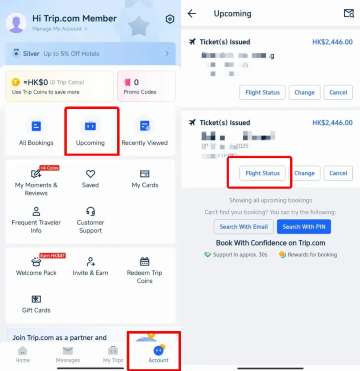
Step 1: Check Upcoming Bookings and View Flight Status
- Open the Trip.com app on your phone and tap on the "Account" tab at the bottom of the screen.
- Tap "Upcoming" to see your bookings, then select the flight you want to update (e.g., from Shanghai to Beijing).
- On the flight page, tap the "Flight Status" button to view your booking details.
Step 2: Edit and Update Your Passenger Info
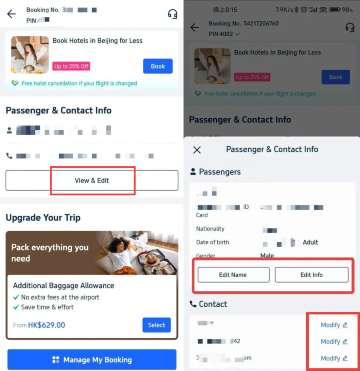
- On the booking page, locate the "Passenger & Contact Info" section, where details like your name, ID, and passport number are displayed.
- Tap the "View & Edit" button to modify your information.
- On the next page, update the relevant fields, such as your passport number, and make any necessary changes to your contact info, like your phone number or email.
Step 3: Edit, Update, and Submit Your ID/Passport Info
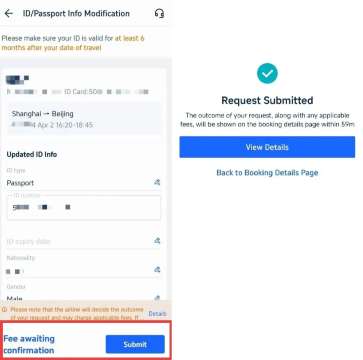
- On the following page, update fields like your passport name and number, ensuring all details are correct.
- When done, tap "Submit" to save your updates.
Stay Connected With Trip.com!
See all attractions
 659539 booked













Can I Change My Passport Number After Booking a Flight?
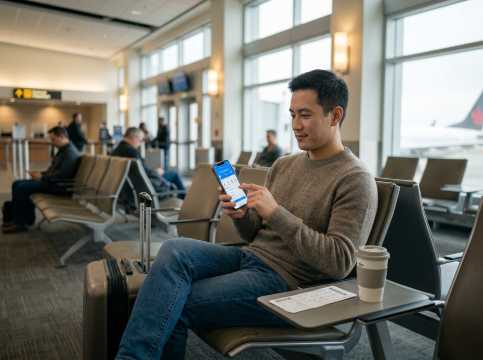
Yes, you can usually change your passport number after booking, but it may depend on the airline’s policy and timing:
- Before Check-In: If your flight is a while away and you haven't checked in, you can typically update your passport details through the airline’s website, app, or by contacting customer support. Most airlines allow this if you’ve renewed your passport or made an error.
- After Check-In: If you've already checked in, updating details may require cancelling the check-in and re-doing it with the new passport details. This might involve additional fees or require support from customer service.
- Fees and Restrictions: Changing your passport number is often free if done early, but some airlines may charge a fee, especially closer to departure. Check with the airline’s policy on Trip.com or contact their customer service for guidance.
What Information Can I Change on Trip.com Flights?
Personal Contact Information
- Email Address: You can update your email to ensure you receive all flight notifications, e-tickets, and updates.
- Phone Number: Changing your contact number helps you stay informed about any flight changes or important alerts.
Passport and Identification Details
- Passport Number: If you've renewed your passport or noticed an error, you can update your passport number.
- Expiration Date: Ensure your passport's expiration date is correct to avoid issues during check-in.
- Nationality: Update if there's been a change or an error in your nationality information.
Frequent Flyer Information
- Frequent Flyer Numbers: Add or modify your frequent flyer details to accumulate points or miles for your trip.
Special Requests and Preferences
- Meal Preferences: Request special meals (vegetarian, vegan, gluten-free, etc.) or update existing ones.
- Seating Preferences: Choose or change your preferred seat if the airline allows seat selection.
- Additional Services: Add services like extra baggage, priority boarding, or travel insurance if available.
Information That Typically Cannot Be Changed

Passenger Name
- Name Changes: Most airlines do not allow full name changes after booking. Minor corrections (like a typo) may be possible but often require contacting customer service and may incur a fee.
Flight Details
- Date and Time: Changing your flight's departure or arrival time usually involves modifying your booking, which may result in fees or fare differences.
- Origin and Destination: Altering the departure or arrival cities is generally not permitted on the same ticket and may require booking a new flight.
[10% OFF] Global Hotel Recommendations
New York
London
Rome
Paris
Sydney
Bangkok
See All Hotels

















































FAQ
-
Can I change my passport number after booking a flight on Trip.com?
-
Can I renew my Canadian passport if I already have a flight booked?
-
Does Trip.com ask for a passport number when booking a flight?
-
Is there a fee to change passport details on Trip.com?
Disclaimer: This article has been provided by an individual contributor or third party platform. If there is any discrepancy regarding the copyright, please contact us directly and we will delete the content immediately.
Trending Searches
-
Trip.com links
-
eSIM/SIM card
-
Air travel guide
- Trip.com Cancellation Policy
- Trip.com Flight Change
- Trip.com E-Receipt
- Trip.com Seat Selection
- Trip.com Flight Cancellation Policy
- Trip.com E-Ticket
- Trip.com Payment Methods
- Trip.com Phone Number
- Trip.com Hotel Refund
- Trip.com Membership
- Trip.com Reviews
- Trip.com Flight Ticket
- Trip.com Booking Fee
- Trip.com Booking Change
- Trip.com Contact
- Trip.com Call Center
- Air Flexibility
- Trip.com Price Match
- Trip.com Pay Installments
- Trip.com Booking Confirmation