How to Use Trip.com Check In: Step-by-Step Online Check-In Guide

By Trip.com
June 28, 2026

Planning to travel by air? This guide will walk you through the steps for flight check in on Trip.com app.
With Trip.com’s smart check-in, you can enjoy a SUPER EASY boarding process. 👍
Bangkok
Singapore
Shanghai
Tokyo
Seoul
New York
See all flights


Methods of Check-In
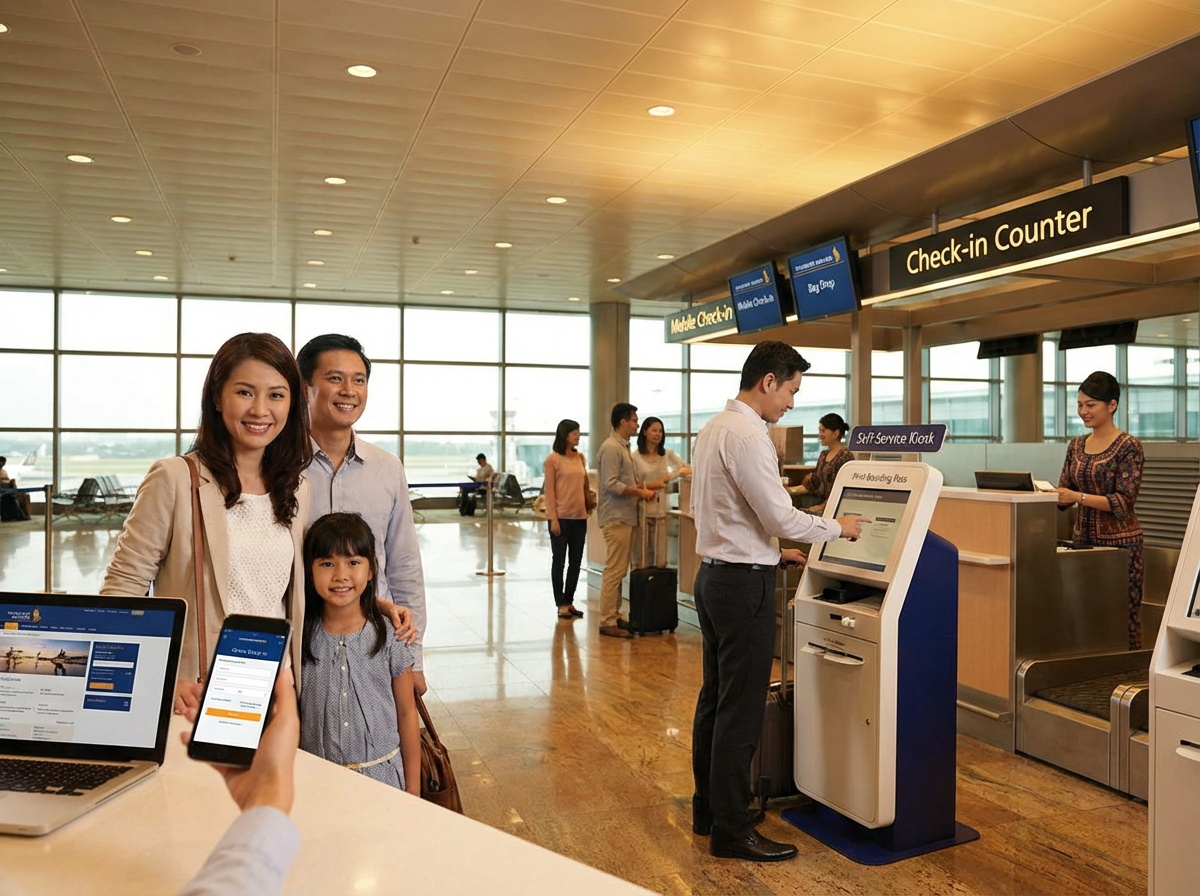
Simply put, check-in is what you do before getting on your flight. It means picking up your boarding pass, checking your luggage, and getting your seat assigned.
There are four main ways to check in for your flight.
Check-In Method | Details |
|---|---|
Airline Counter | Requires waiting in line. |
Check-In Machine at the Airport | Available at virtually all major airports worldwide |
Trip.com Smart Check-In |
|
Airline Website | If you don’t have checked baggage for the day of your flight, you can go directly to security with your online boarding pass. |
Quick Tips: When checking in for international flights, most airlines (including budget carriers) will ask for your Passenger Record Number (PNR) or booking code. You can easily find this in your booking details on the Trip.com app or website, under the airline booking code and e-ticket number section.
How to Check In on Trip.com App
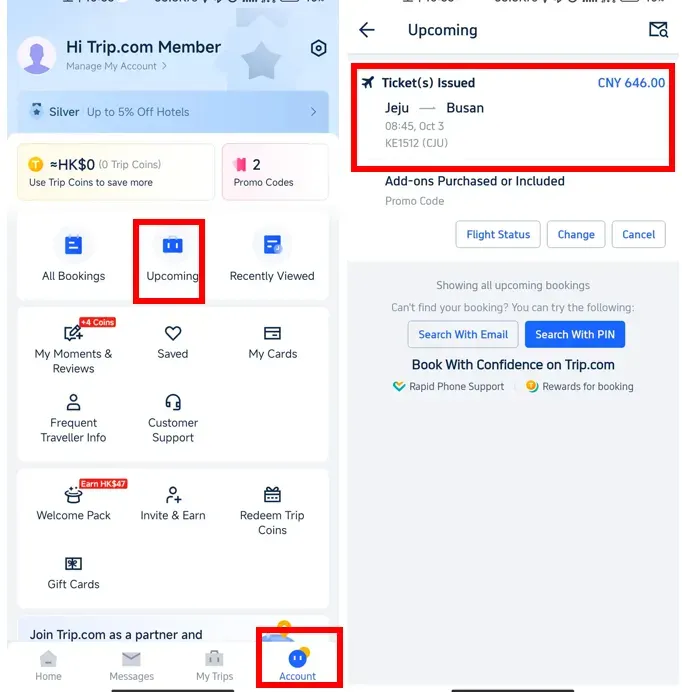
Step 1: 'Upcoming'>'Tickets Issued'
Log into your Trip.com account. Once you're in, tap on the "Upcoming" section to find your flight booking. Click on the booking to initiate the Trip.com smart check-in process.
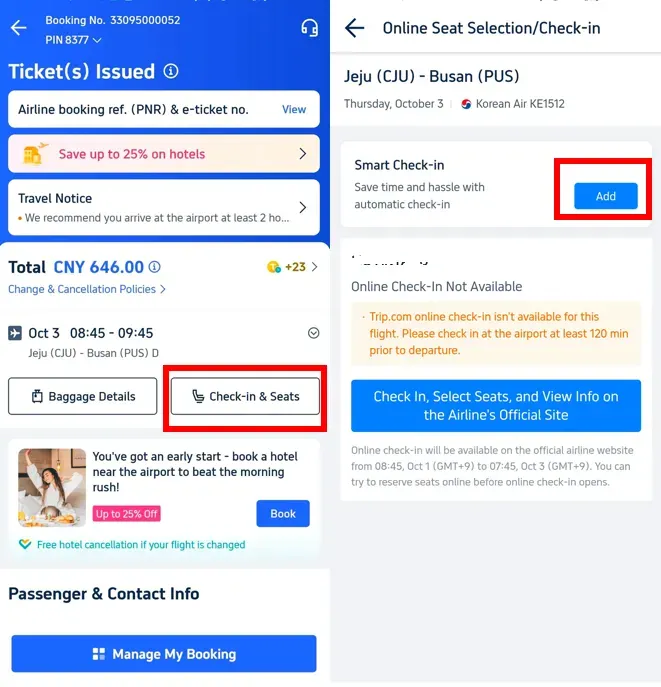
Step 2: 'Check-in & Seats'>'Smart Check-in'
Tap on "Check-in & Seats" to access the details of your flight. From there, click on "Add" to start the check-in process with Trip.com.
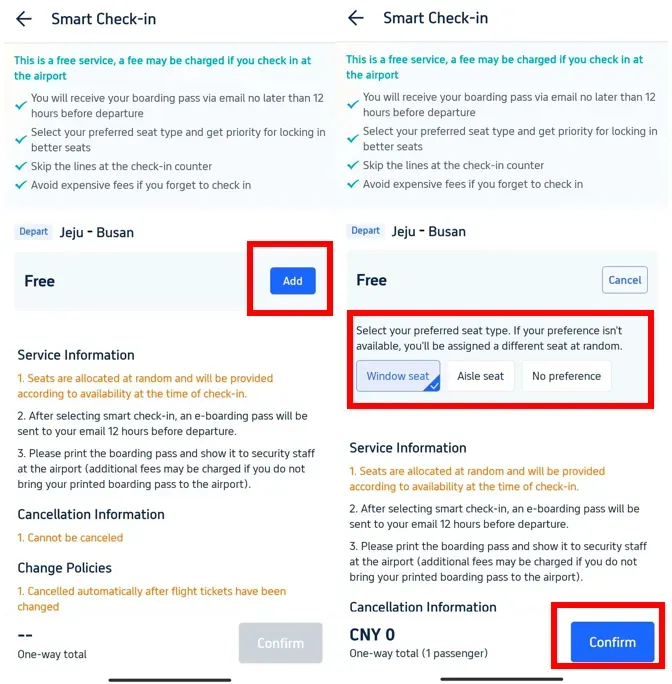
Step 3: Select Seat and 'Confirm'
After tapping on "Add," choose your preferred seat type from the available options. Once you've made your selection, click "Confirm" to complete your check-in on Trip.com.
Stay Connected With Trip.com!
See all attractions
 665149 booked













How Early Can I Check In for My Flight?

The exact timing for when you can check in varies slightly by airline and whether you are checking in online or at the airport. Here’s the most current information:
Online Check In
Online Check In Details | Information |
|---|---|
Counter opening time | Usually 24 hours before departure. Some airlines such as Singapore Airlines and Cathay Pacific usually allow online check in up to 48 hours before departure. |
Check in cut off time | Commonly 45 minutes to 90 minutes before departure, depending on the airline and route. |
Airport Check In
Airport Check In Details | Information |
|---|---|
Counter opening time | About 3 hours before international flights and 2 hours before domestic flights. |
Check in cut off time | Around 45 minutes for domestic flights and 60-90 minutes for international flights. |
Tips: Arriving early helps avoid stress, especially during peak travel periods.
Should I Check In Online or at the Airport?

If online check in is available, it is usually the better option. It saves time and makes your travel day smoother. However, if you have specific needs that require airport assistance, plan to arrive early to complete the check-in process smoothly.
Online Check-In
Online check in is the most convenient option for most travellers. It allows you to confirm your seat early and save time at the airport.
Online Check In | Information |
|---|---|
Advantages | Fast and convenient. You can choose your seat earlier and avoid long queues at the airport. Also lets you print your boarding pass at home or use a mobile boarding pass. |
Best For | Travellers who prefer convenience and want to minimize time spent at the airport. |
Airport Check-In
Go to airport check in if you need personal assistance or have special travel requirements.
Airport Check In | Information |
|---|---|
Advantages | Essential if you need special assistance, are travelling with oversized luggage, or if online check-in isn’t available (e.g., due to visa requirements). |
Best For | Travellers with complex travel needs or those who prefer in person support at the airport. |
[10% OFF] Global Hotel Recommendations
Bangkok
Singapore
Shanghai
Tokyo
Seoul
New York
See All Hotels

















































Trip.com Check In FAQs
-
Why is Trip.com online check-in not available for my flight?
-
Can I use Trip.com Check In if I have checked baggage?
-
Is the Trip.com check-in confirmation the same as a boarding pass?
-
Can I check in online through Trip.com for international flights?
-
What do I need to bring to the airport after Trip.com Check In?
-
Can I cancel my flight after completing Trip.com Check In?
-
Can I check in online through Trip.com for all legs of a connecting flight?
Disclaimer: This article has been provided by an individual contributor or third party platform. If there is any discrepancy regarding the copyright, please contact us directly and we will delete the content immediately.
Trending Searches
-
Trip.com links
-
eSIM/SIM card
-
Air travel guide
- Trip Coins
- Trip.com Flight Change
- Trip.com E-Receipt
- Trip.com Seat Selection
- Trip.com Flight Cancellation Policy
- Trip.com E-Ticket
- Trip.com Customer Service
- Trip.com Payment Methods
- Trip.com Phone Number
- Trip.com Hotel Refund
- Trip.com Change Passport
- Trip.com Check in
- Trip.com Reviews
- Trip.com Flight Ticket
- Trip.com Booking Fee
- Trip.com Booking Change
- Trip.com Contact
- Trip.com Call Center
- Air Flexibility
- How to List your Property on Trip.com