Trip.com Baggage Allowance: How to Check and Manage Your Bags

By Trip.com
June 29, 2026
After booking your flight on Trip.com, it’s important to double check if your baggage allowance fits your needs.
If you want to check how much free baggage you can get, or you need to add extra baggage, read on because Trip.com makes it easy! ✅
Bangkok
Shanghai
Osaka
Seoul
See all flights


Step-by-Step: Baggage Allowance on Trip.com App
Trip.com does not have its own baggage rules, but would show the official baggage allowance provided by the airline you book with. Let's walk through the steps to check or add baggage allowance using the Trip.com app.🧳
Step 1: Find Your Booked Flight
The first step is to find your booked trips on the mobile app, here are the detailed operations:
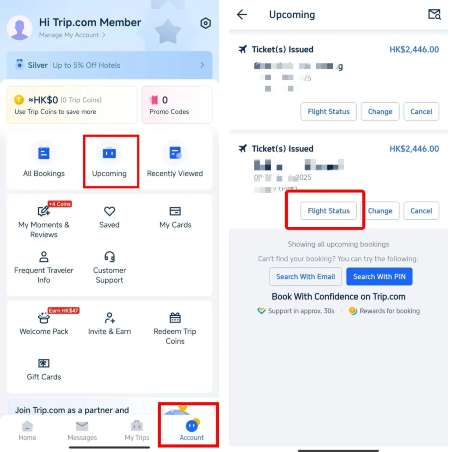
- First, download the Trip.com app if you haven't. Open the Trip.com App on your device.
- Tap Account Icon. You can find this icon at the bottom of the app screen easily. Tap to go to your account page.
- Look for the "Upcoming" option. On your account page, there’s a button in the centre says "Upcoming." Tap this button, you will see all your upcoming trips.
Step 2: Check Your Flight Status
Next, you need to open the target flight to check more detailed information.
- Select Your Flight. You will see a list of flights you have booked. Find the flight you want to check and tap on it.
- View the basic ticket information. After you choose the flight, you can see some simple details of your ticket.
- Tap the "Flight Status" button. For more flight details, tap the "Flight Status" button.
Step 3: Check Your Baggage Allowance
Now is the key step to know the free baggage you can take with your ticket for travel preparation.
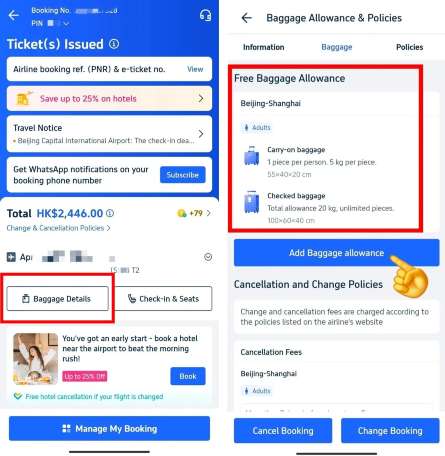
- Find the Baggage Details button. On the new page with full ticket information, look for this button and tap to see your baggage allowance.
- Check the included free baggage. On this page, you can find all free baggage allowed. It includes carry-on baggage and checked baggage.
- Look at the number and weight limits. The page will tell you how many bag you can take, and the maximum weight of each bag.
- For example: You can take one carry-on bag up to 5 kg and one checked bag up to 20 kg.
Step 4: Add More Baggage Allowance
If your bags are too heavy or you need more bags, you can add extra baggage on the app directly, do not wait until the airport.
Tap the Add Baggage Allowance button. You can find this button on the Baggage Details page directly if you need additional baggage.
Step 5: Choose Your Extra Baggage Allowance
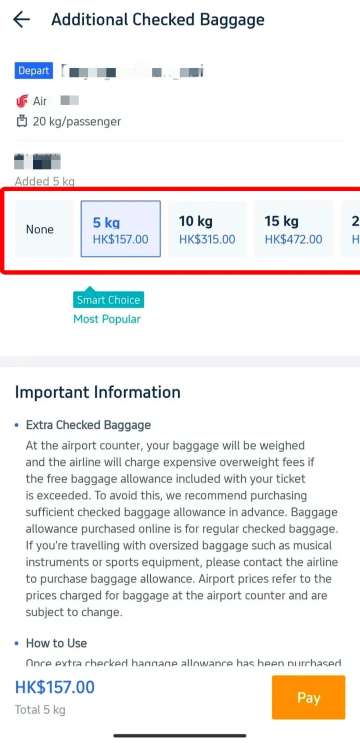
After you tap the add button, you can choose the extra baggage you need for your trip.
- Choose how many extra kilograms you need. The app will show you different baggage choices with the price of each option. Pick the one you need.
- You can also choose the "Smart Choice" option. This is a popular choice that many traveller select.
Stay Connected With Trip.com!
See all attractions
 669745 booked













Trip.com Tips for Managing Baggage Allowance

Avoid Extra Fees at the Airport
You should weigh your bags before you go to the airport. Airlines will weigh all bags at the check-in counter. If your baggage exceed the weight limit, you will pay extra fees. It is much cheaper to add extra baggage on the app early, so you will not meet unexpected cost at the airport.
Special Baggage
If you carry large items like musical instruments or sports equipment, you need to contact the airline directly. These special items need special arrangements. The fees for oversized baggage at the airport are very high, higher than booking in advance.
Baggage Rules for Low-Cost Airlines
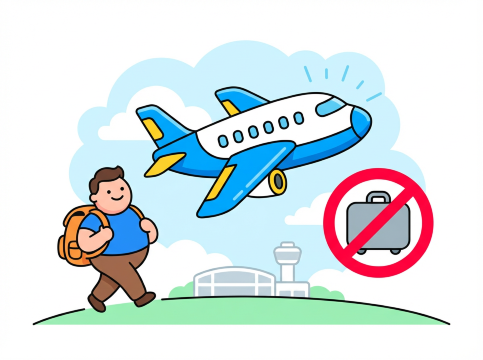
Many low-cost airlines do not provide free checked baggage in their basic ticket price. You must pay attention to this when booking cheap discounted flights.
When you book flights on Trip.com:
- Checked baggage may be available as a paid add-on
- Adding baggage online is more cheaper than paying for it at the airport.
- Some promotional fares may not allow passengers to add more baggage allowance.
Start Your Journey with Trip.com!

Trip.com is a global online travel agency offering 24/7 customer service in multiple languages. It makes booking flights, hotels, and activities easy and convenient. As a Platinum or Diamond member, you can enjoy perks like free airport lounge access, earn extra Trip Coins, and save even more on hotel bookings.
Discounted Global Top Hotel Selection
See All Hotels









Trip.com Baggage Allowance FAQ
-
Do you have to check a bag twice?
-
Is it more expensive to add baggage after booking?
-
Can I bring 3 bags as carry-on?
Disclaimer: This article has been provided by an individual contributor or third party platform. If there is any discrepancy regarding the copyright, please contact us directly and we will delete the content immediately.
Trending Searches
-
Trip.com links
-
eSIM/SIM card
-
Air travel guide
- Trip.com Cancellation Policy
- Trip.com E-Receipt
- Trip.com Seat Selection
- Trip.com Flight Cancellation Policy
- Trip.com E-Ticket
- Trip.com Customer Service
- Trip.com Payment Methods
- Trip.com Phone Number
- Trip.com Membership
- Trip.com Change Passport
- Trip.com Check in
- Trip.com Reviews
- Trip.com Ticket Issued Status
- Trip.com Flight Ticket
- Trip.com Contact
- Trip.com Refund
- Trip.com Call Center
- Air Flexibility
- How to List your Property on Trip.com
- Trip.com Price Match
- How to Order Food in China
- Shanghai Metro Map
- Hotels near Dulles International Airport
- Hotels in Bur Dubai
- Hotels in Aspire Zone - Sports City
- Hotels near East Fort Seal Bay
- Hotels near Palm Springs International Airport
- Hotels near Vaclav Havel Airport Prague
- Hotels near Blue Heron Lake
- Hotels near John Glenn Columbus International Airport