How to Find Trip.com Contact: Phone Numbers & Live Chat

By Trip.com
June 28, 2026

Need Trip.com help worldwide? Find global Trip.com contact numbers, Trip.com contact chat - live agent tips, emergency support, and how to get fast travel issue fixes.
Bangkok
Singapore
Shanghai
Tokyo
Seoul
New York
See all flights


How to Contact Trip.com? 4 Easy Ways

Not sure whether to call or chat? Here’s how to choose the best Trip.com contact method for your needs:
Contact Channel | How to Use It | Availability | Languages Supported |
You can find Trip.com Phone Number for your regions and make a phone call (may charge) or Open Trip.com App, go to Message tab, tap headphone icon on the top right to enter customer service page. Then tap "Call us", you can choose VoIP to call Trip.com for free. | 24/7 for flights, hotels, trains, cars; fixed hours for tours or attractions. | English, Cantonese, Japanese, Korean, Thai + more | |
Desktop: Go to Trip.com’s Support Page → click “Chat”. Type and send 'Transfer to an agent' to speak with a live agent. App: Tap “Message” tab → tap the headphone icon → tap "Chat With Us" | Same hours as phone line | Same as phone line | |
Trip.com Emergency Help | App: Tap “Message” → headphone icon → “Emergency Assistance” Or call the global phone number for your region | 24/7 (for situations such as medical translation, lost bags, or last-minute booking problems) | Same as phone line |
Stay Connected With Trip.com!
See all attractions
 659539 booked













How to Find Trip.com Phone Numbers & Make Free Calls
Trip.com Contact Phone is the fastest way to get phone number of all regions!
Note: International call fees might apply, check your phone plan first. Using the VoIP call feature on the Trip.com app is recommended.
Find Trip.com Numbers on Website
Go directly to the official Trip.com phone number page: https://ca.trip.com/help/. The page lists contact numbers for over 40 countries/regions and global access numbers. Each entry includes service hours
Find Numbers or Make Free Calls on App
To contact Trip.com or find their phone number via the Trip.com app:
- Log in, go to “Account,” then tap “Customer Support.”
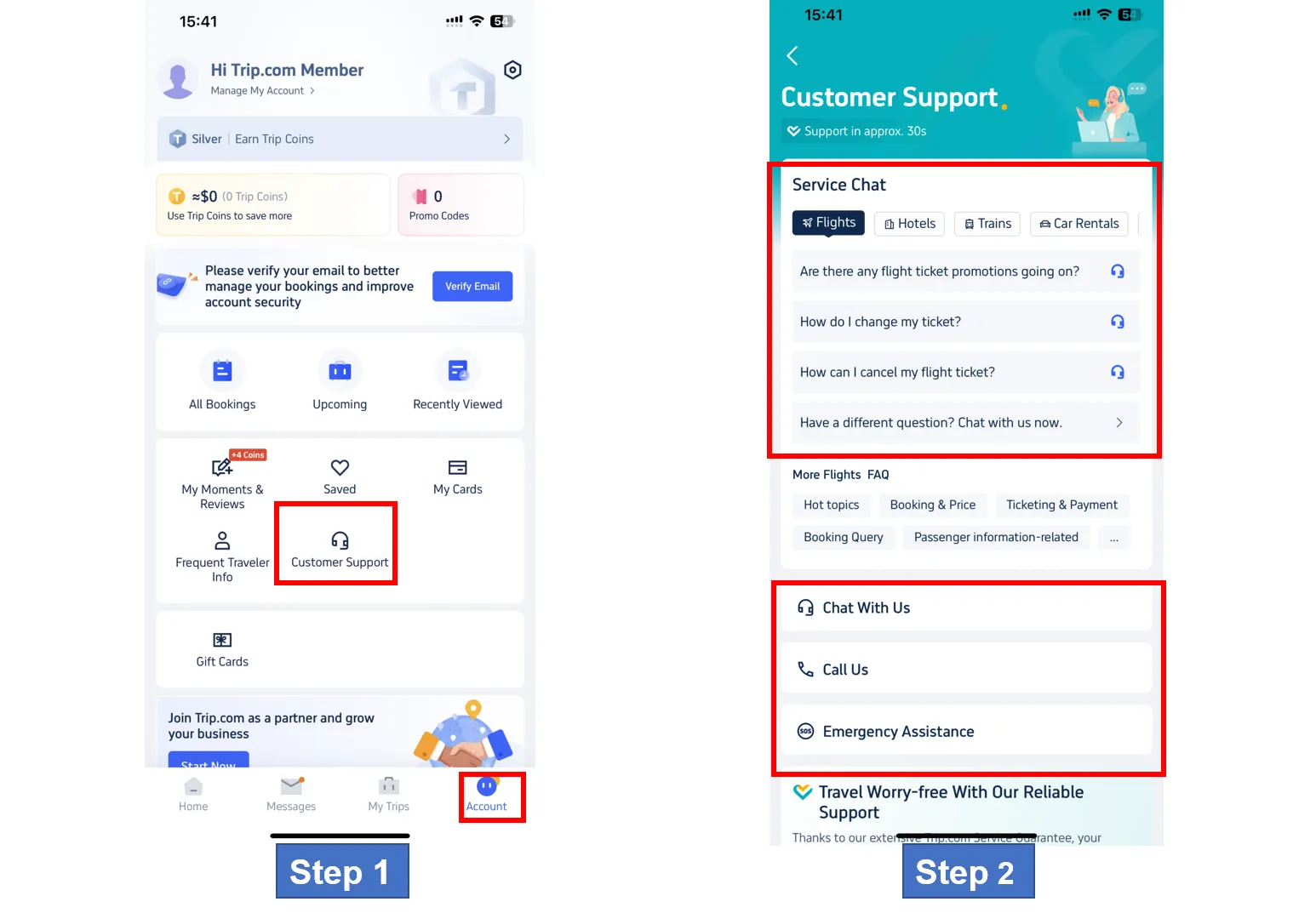
- Select “Call Us” to see two options: Free VoIP (Internet Call) and Regional Phone Numbers
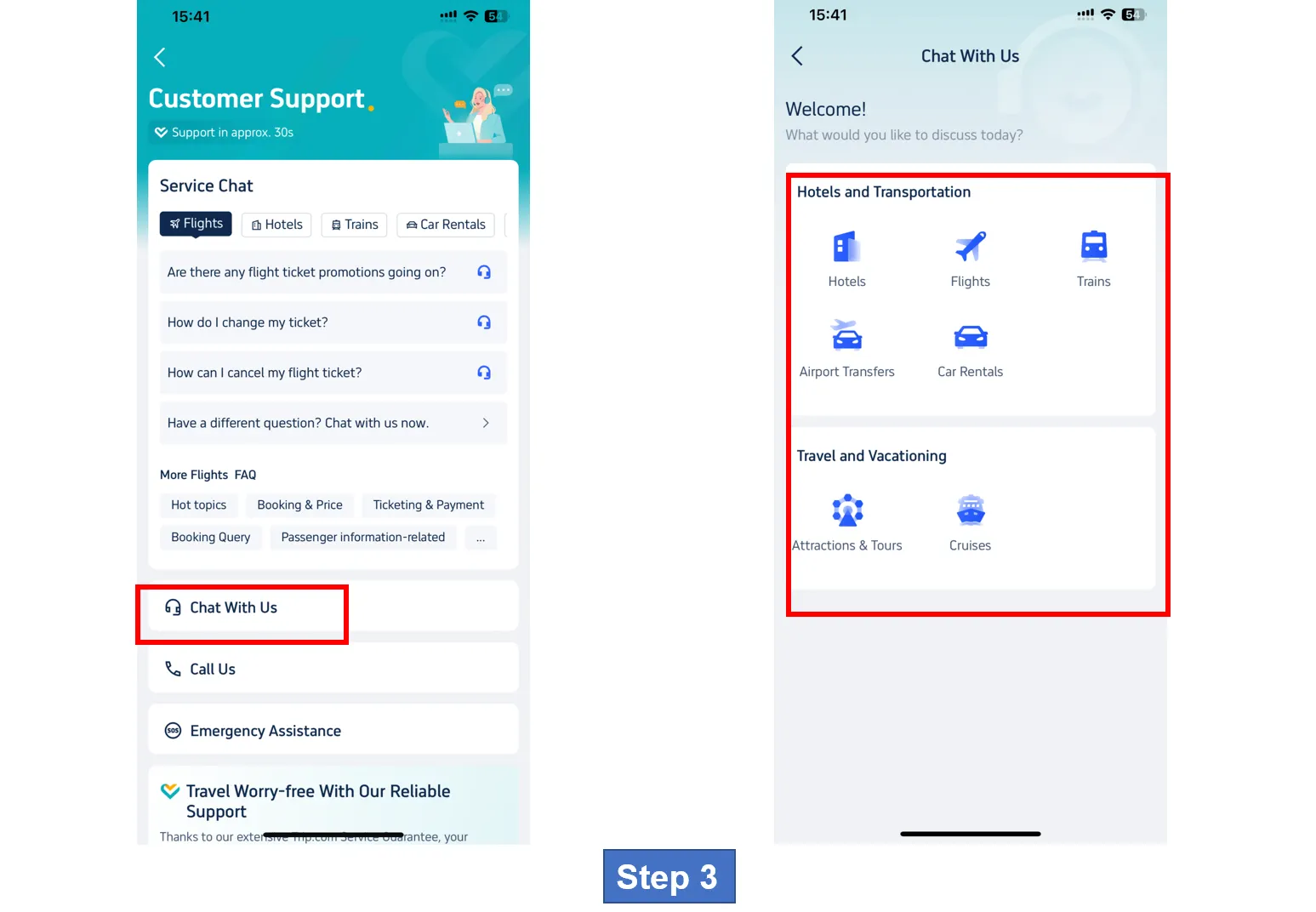
- Use the free VoIP (Internet call) (top option) for in-app call support.
- For phone calls: Select “Call Us” to use Internet/Global Call, or “Other countries and regions” for international numbers.
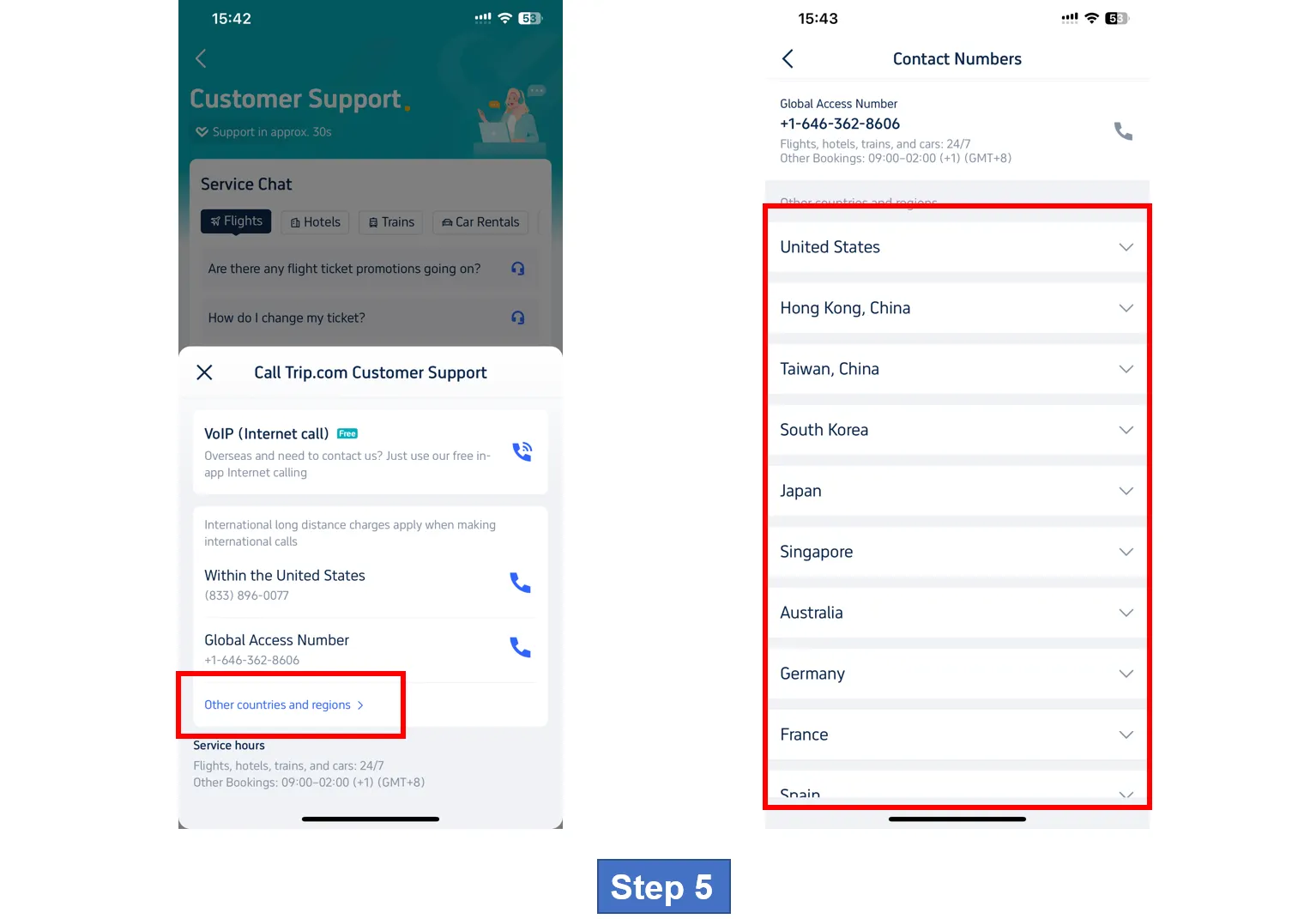
For emergencies: Tap “Emergency Assistance” for medical, translation, or urgent support.
How to Find Trip.com Contact Numbers for More Regions
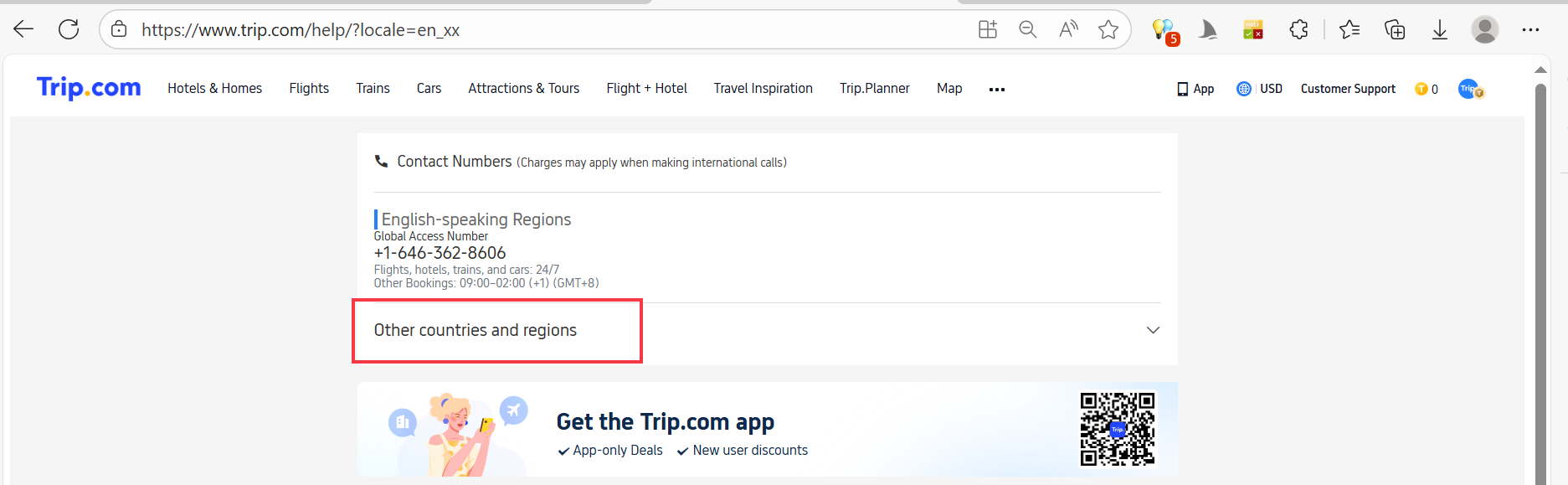
If your country is not listed, please follow the steps below to obtain local contact information:
- Please visit Trip.com official help page.
- Scroll down to the "Contact Numbers" section. Look for the "Other Countries and Regions" button
- Click this button to open the drop-down menu, and then select your country/region.
- This page will display your local phone number, global access number and working hours.
Tip: Save this page on your phone so that if you travel to different places, you can quickly check the latest numbers.
How to Find Trip.com Contact & Customer Service
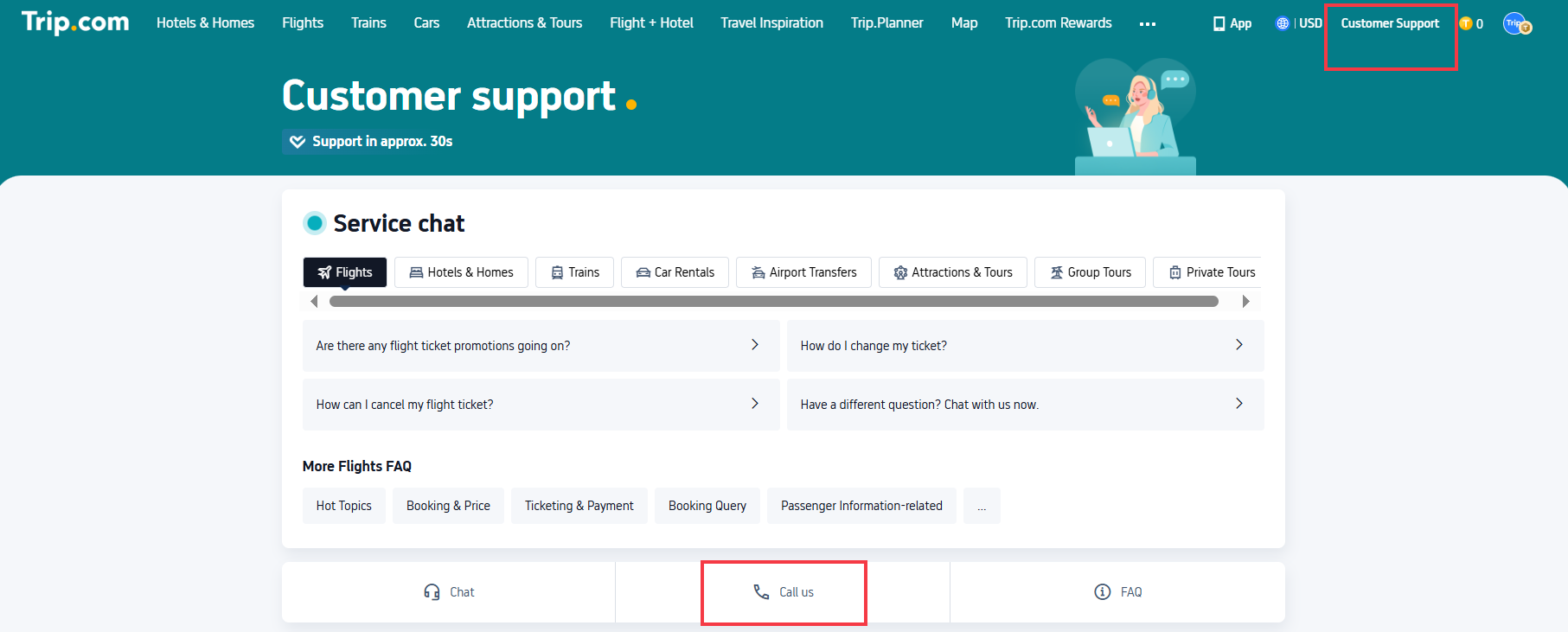
Seeking support during a trip can be quite stressful - here are some simple tips for Trip.com contact on both desktops and apps:
Desktop (Any Country)
- Open the Global support page of Trip.com in your browser. Or you can also click "Customer Support" on the top right corner on Trip.com homepage.
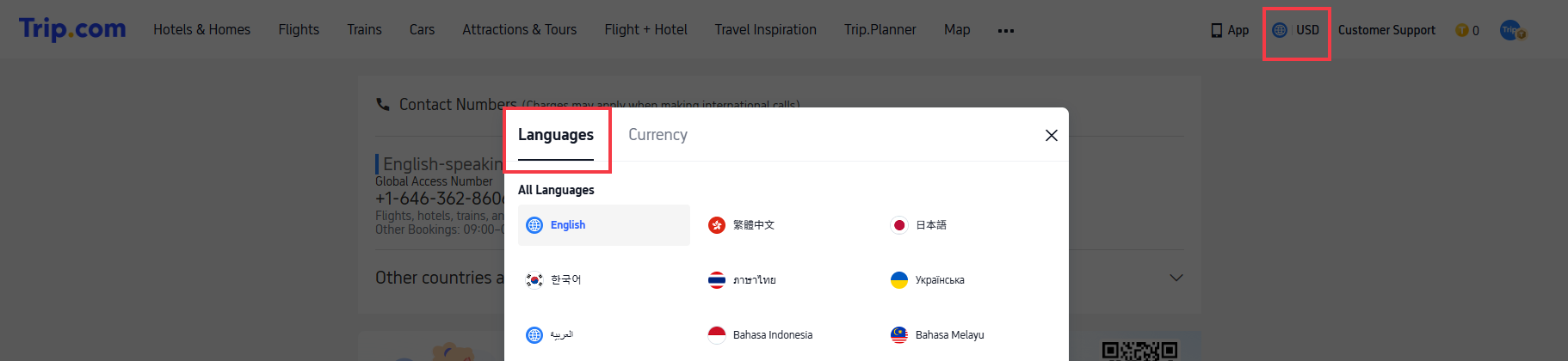
- Click “Change Region” (top-right corner) and select where you are now
- Scroll down—you’ll see a “Chat” or "Call us" button. No need to hunt for regional pages! Or click if you're simply looking for Trip.com contact numbers, then copy, dial and call Trip.com on your phone.
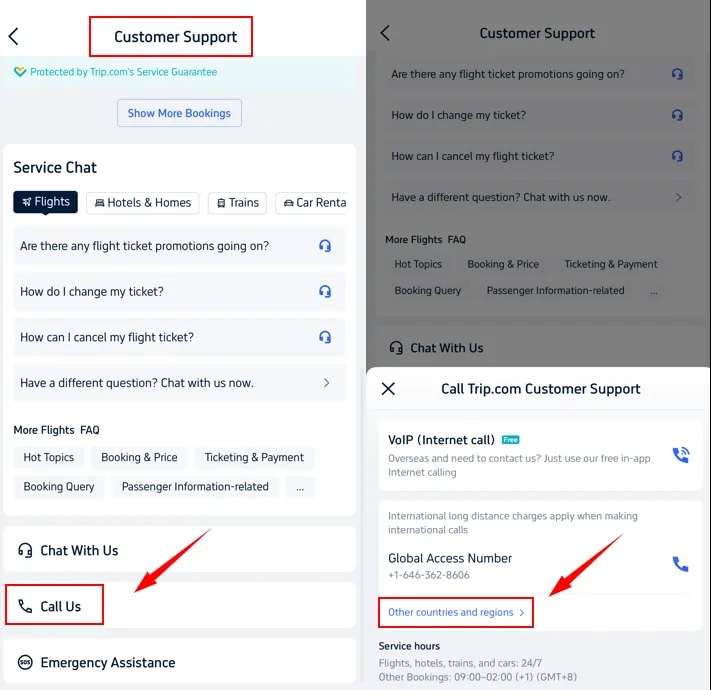
Mobile App (Best for Travellers)
- Open the Trip.com app and log in (this saves your booking info, so support doesn’t have to ask for it).
- Tap the “Message” tab, then the headphone icon (that’s customer service).
- Use these time-savers:
- “Call us”: The app automatically shows a local number for where you are
- “Free Internet Call”: Tap this to use VoIP—no international charges (just Wi-Fi or data)
- Save support to your home screen: Hold down the headphone icon, then add it to your app’s home screen. No more searching later!
Car Rentals
Car Rental Promo Code - 8% Off
New User Enjoy up to 8% Off
TRIPCAR8
Trip.com Live Chat - How to Skip Bots & Talk to a Live Agent
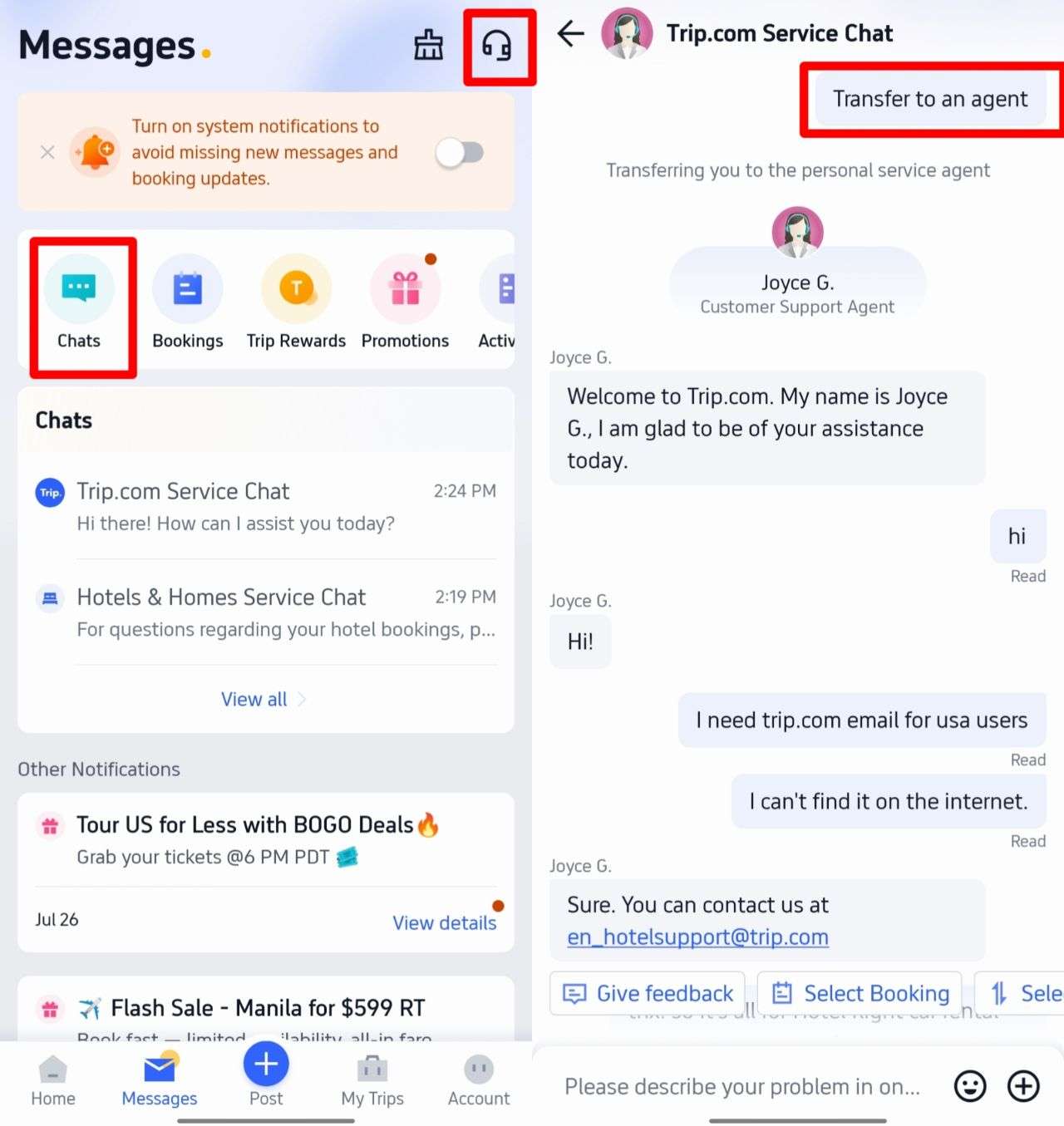
Live chat is great for non-urgent issues—but automated bots can be annoying. Here’s how to get a real person fast:
Step 1: Open Live Chat
- Desktop: Go to Trip.com Support→ click “Chat” in the middle of the page.
- App: Tap “Message” → headphone icon → “Chat with us”.
Step 2: Get to a Live Agent
- Type “Transfer to an agent” (this works in all regions—you don’t need to use the local language).
- Next, pick your issue type—don’t pick “Other”. If you choose a specific category, you’ll get connected straight to a specialist who knows about your problem (no transfers!).
- Wait 30 sec–2 minutes—you’ll be talking to a live agent soon. Most questions get fixed within an hour.
Trip.com Emergency Support Abroad Coverage
Trip.com’s 24/7 emergency support is for bad travel crises—here’s exactly what it helps with, and what you need to know:
What Emergency Support Helps With
- Medical translation: If you’re sick abroad and can’t speak the local language, Trip.com connects you to a phone translator or helps get an in-person translator.
- Lost baggage: If your baggage goes missing on an international flight, they give you airline or customs contact info and help you file a claim.
- Hotel check-in problems: If your hotel says “no room” even though you have a confirmed booking, they fix it (e.g. offering nearby hotel options and covering the price difference).
Important Rules for Emergency Support
- Don’t use it for non-urgent stuff (like “changing tour itinerary”)—save it for real crises.
- You have to pay translator fees: Trip.com helps find the translator for free, but you cover the cost
- They won’t cover the cost of lost items if your bags are lost—they just help you find your bags.
How Can Trip.com Customer Service Help You?

Trip.com customer service provides support for international travelers - here is what makes it different:
- There is no time zone issue: Flight, hotel, train and car support is 24/7. So, if you are across the world and encounter flight problems at 2 a.m., you can call for help.
- Consistent service is everywhere: people traveling in London receive responses as quickly as those in Toronto - without "local-only" delays.
- Free in-app calls: Unlike some local travel websites (which charge for international calls), Trip.com's Internet calls are free worldwide (only Wi-Fi or data is required).
- Global Booking Guarantee: If your flight in Bangkok is cancelled or there are no rooms available in your hotel in New York, Trip.com's guarantee applies - no matter where you are, they will help you out.
[10% Off] Global Hotel Recommendations
See All Hotels









FAQs about Trip.com Contact
-
What if I can’t find the Trip.com contact number for my region?
-
What’s the fastest way to submit a complaint via Trip.com contact?
-
How do I talk to a real person when using Trip.com contact live chat?
-
Can I get Trip.com support in languages other than English?
Disclaimer: This article has been provided by an individual contributor or third party platform. If there is any discrepancy regarding the copyright, please contact us directly and we will delete the content immediately.
Trending Searches
-
Trip.com links
-
eSIM/SIM card
-
Air travel guide
- Trip.com Cancellation Policy
- Trip Coins
- Trip.com VIP Lounge Access
- Trip.com E-Receipt
- Trip.com Seat Selection
- Trip.com E-Ticket
- Trip.com Customer Service
- Trip.com Payment Methods
- Trip.com Hotel Refund
- Trip.com Membership
- Trip.com Change Passport
- Trip.com Check in
- Trip.com Reviews
- Trip.com Flight Ticket
- Trip.com Baggage Allowance
- Trip.com App
- Trip.com Booking Fee
- Trip.com Call Center
- Trip.com Pay Installments
- Trip.com Booking Confirmation