



The vehicle was in very good condition and the return process was also smooth.
Car Rentals
Drop off at a different location
Driver's Age: 30-60Driving licence issuing country/region:
10:00
10:00
3 days
Promo codesEnjoy discounts upon discounts
New user
8% Off
Book now and save
Valid for 15 days once claimed
Claim
Flyer/hotel guest exclusive offersUnlock exclusive car rental prices for your booked flights or hotels
Flexible rentalsFlexible cancellation policy - plan your trip with ease
Transport booking guaranteeIf the flight, train, or bus you booked with a rental car on Trip.com is delayed or cancelled, you can contact us for free assistance to either keep or cancel your rental car
Rapid customer supportWe usually answer your call within 30 seconds, ensuring reliable support throughout your car rental journey
Popular car rental types
View All
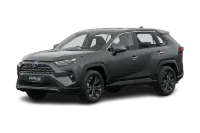
Intermediate SUV
Toyota RAV4
5
3
4
From
PHP 1,647.12/day
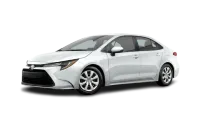
Intermediate car
Toyota Corolla
5
2
4
From
PHP 1,228.61/day
Compact car
Toyota Corolla
5
2
4
From
PHP 2,447.37/day
Minivan
Dodge Grand Caravan

7
3
4
From
PHP 2,604.97/day
Special
Hyundai Elantra

5
2
4
From
PHP 2,794.25/day
Pickup
Ford F150

5
3
4
From
PHP 3,178.60/day
Car rental user reviews

Anonymous user
Oct 13, 2025
Nissan Kicks
Original text

_TITW******aolljj
Dec 3, 2025
Dodge Durango
The vehicle was in good condition, but I wish it were cleaner, as the windshield wasn't perfectly clean when I picked it up, making the view ahead less comfortable while driving. However, since I had to return the car late on the last day, customer service and Avis responded very quickly and addressed my questions and concerns promptly. Highly recommended!
Original text
Anonymous user
Sep 29, 2025
Toyota RAV4
I booked a Toyota SUV online and was given a Mazda CX-5 when I picked it up. It was my first time driving this model, and I enjoyed it quite well. The fuel consumption was a bit high, and the overtaking power was a bit lacking, but otherwise, it was quite good. Picking up and returning the car were both at the airport, which was very convenient, and the staff were very friendly. I'd definitely consider renting with this company again.
Original text



FAQ
Car rental guide
On Trip.com, you can find multiple options for car rentals, tailored to your destination, budget, or group size. You’ll always get a cost-effective deal on Trip.com for economy, mid-size, and luxury cars. We offer flash sale discounts up to 50%. Get your 8% off coupon to rent a car for the very first time!
Why Choose Trip.com for Car Rentals?
- Global Coverage with Local Support: Trip.com serves 200 + countries and 10,000 + cities for car rentals. Popular destinations, such as Korea, Japan, the United States, Australia, and China, are available for car rentals on Trip.com.
- Competitive Pricing and Exclusive Discounts: Trip.com frequently offers promotions. For first-time users, an 8% discount is given!
- Add Car Rental Insurance: You can buy extra insurance for your car rental at a reasonable price on Trip.com. Whether it’s for vehicle damage or theft protection, we’re here to make you safe, and your rights are always guaranteed!
- Flexible Cancellation Policy: Trip.com offers free cancellation and a refund. You can get a full refund if you cancel within the free period. You may be charged a fee if you cancel after the deadline. Please read the car rental policy carefully before you book!
- Diverse Car Types: You have many choices for cars, whether it’s for a family trip or a friend's trip. From compact car to minivan, luxury car to green vehicles, we’ve got it all! Trip.com always fits your current demands.
- Flexible Car Rental Options: One-way or long-term rentals available. Support "pick up at location A, return at location B" for cross-city trips.
- 24/7 Services: Trip.com offers year-round services. Feel free to contact us! We also provide multilingual services (like Korean, Japanese, and Thai).
Global Car Rental Recommendations on Trip.com
Make a quick search on Trip.com for cost-effective car rentals worldwide.
Car rental picks for global tourist cities: Toronto Car Rental, Vancouver Car Rental, Calgary Car Rental, Los Angeles Car Rental, Okinawa Car Rental
Car rental picks at popular global airports: Pearson International Airport Car Rental, Vancouver International Airport Car Rental, Calgary International Airport Car Rental, Los Angeles International Airport Car Rental, Naha Airport Car Rental
Renowned global car rental companies’ picks: Thrifty, ALAMO, Avis, BUDGET, KS Rental Car
Canada Car Rental Recommendations
Book your Canada car rental deals on Trip.com, where many popular car rental brands offer their thoughtful services. You can always get good plans here with Trip.com! Pick up one of the popular companies for car rentals in Canada that perfectly fits your needs.
Thrifty: Hertz-owned, budget-friendly, perfect for budget travelers, low-cost car rentals for leisure visitors, and quality guaranteed.
ALAMO: Pioneers of unlimited free mileage, high-value rentals, faster pickups, multilingual services, and scattered around the world's top tourist destinations.
Notes for Car Rentals on Trip.com
How to find the best car rental company?
Rent a nice car before you go on a road trip! Every detail matters, including car types, pickup and return locations, budget, and car rental insurance. It saves you a lot of time to compare different car carriers on Trip.com. No matter what kind of journey you do (downtown trip, family tour, or outdoor adventure), what type of car you need (compact or van), or how long you rent, we’re here to make your choice more doable and customized!
How to compare prices via Trip.com?
Choose your time, pickup/return spot, and preferred car type. You’ll quickly get useful references about prices and car rental plans from different car providers. Make the best decision based on your itineraries and preferences!
How to purchase car rental insurance?
When renting a car on Trip.com, you can add car insurance coverage directly on the reservation page. The premium plan offers full protection, including Collision Damage Waiver, Third-Party Liability Coverage, Glass & Tire Damage Protection, and 24/7 Roadside Assistance. With a $0 deductible, you won’t face any out-of-pocket expenses – enjoy a worry-free journey!
Can I rent a car without a credit card on Trip.com?
Yes! For car rentals on Trip.com, you’re usually required to provide your valid credit card for payment or security guarantees. You can also use your available Trip Coins to cover charges when your balance is enough.
How to use ETC after renting a car in Canada?
Car rental companies in Canada typically offer automatic toll payment services. Drive through the ETC (Electronic Toll Collection System) lane as normal, and the system will automatically detect and deduct the toll. It allows you to pass without stopping, saving time and hassle!
Recommendation
- Fukuoka Airport Car rental
- AlUla International Airport Car rental
- Denver International Airport Car rental
- Frankfurt Airport Car rental
- Muscat International Airport Car rental
- Calgary International Airport Car rental
- Chisinau International Airport Car rental
- Labasa Airport Car rental
- Vancouver International Airport Car rental
- Venice Marco Polo Airport Car rental
- Dublin Airport Car rental
- Savannakhet Airport Car rental
- Bucharest Henri Coanda International Airport Car rental
- São Paulo/Guarulhos International Airport Car rental
- Nouakchott–Oumtounsy International Airport Car rental
- HM RENT A CAR car rentals
- The Safe Rent A Car car rentals
- BE KOBE car rentals
- SouKyo Rent A Car car rentals
- RDZ RENT A CAR car rentals
- RAKURAKU Rental Car car rentals
- EPTA car rentals
- Travel Car car rentals
- Blue Rental car rentals
- E-drive car rentals
- Chic Car Rent car rentals
- Nippon Rent a Car car rentals
- GoSo Rent A Car car rentals
- East Coast car rentals
- Hertz car rentals
- Orix car rentals
- Asap car rentals
- CHIH HANG CAR RENTAL car rentals
- Cheapa Car Rental car rentals
- Joy Car Rental car rentals
- RDZ RENT A CAR car rentals in Nagoya
- BE KOBE car rentals in Chitose
- Blue Rental car rentals in Christchurch
- The Safe Rent A Car car rentals in Jeju
- VT Rentals car rentals in Kuala Lumpur
- LOTTE rent a car car rentals in Jeju
- BELLA Car Rental car rentals in Jeju
- Chailease car rental car rentals in Taipei
- Easy Car car rentals in Osaka
- KICHIJO RENTAL CAR car rentals in Osaka
- TIANGONG RENT A CAR car rentals in Okinawa
- Hua Xin International Car Rental car rentals in Taipei
- Hoing car rentals in Taipei
- Clover Car Rental car rentals in Chitose
- Clover Car Rental car rentals in Sapporo
- Hotels in Las Vegas
- Hotels in Orlando
- Hotels in London
- Hotels in San Diego
- Hotels in Chicago
- Hotels in New York
- Hotels in Paris
- Hotels in Rome
- Hotels in Edinburgh
- Hotels in Boston
- Hotels in Nashville
- Hotels in Shanghai
- Hotels in Hong Kong
- Hotels in Macau
- Hotels in Bangkok
- Hotels in Singapore
- Hotels in Dubai
- Hotels in Beijing
- Hotels in Guangzhou
- Hotels in Shenzhen
- Free Beijing Layover Tour
- Free Shanghai Layover Tour