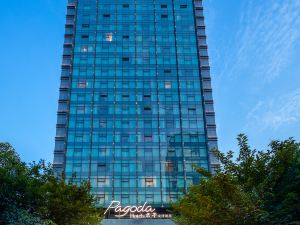
Hotel near Wulin Square/Hangzhou Center,Hangzhou15.2% of visitors choose this area
BBON9702026.06.09
Room 04-07 on a higher floor (20F-25F).
Offers a distant view of West Lake.
Rooms 02 and 03 are connecting rooms. I was initially given 2303 and asked staff to help me switch.
A big thank you to Wilson Wan, Mercy Zhou, and Serena Xiao at the front desk for their help with the coordination.
Hotel breakfast and service were good. The only slight inconvenience is that it's a bit far from the subway.
Very Good
1892 reviews
9.2/10
Price from
CAD 153
per night
Check Availability
See all JW Marriott properties in Hangzhou
FAQs About JW Marriott Properties in Hangzhou
How do I book a hotel on Trip.com?
To book a hotel on Trip.com, simply enter your destination, travel dates, and the number of guests on the page. Then, browse through the available hotels and select the one you want to book. Follow the prompts to enter your payment information and complete the booking.
How do I get hotel deals on Trip.com?
There are several ways to find affordable hotels on Trip.com. You can narrow down your search results by filtering hotels according to your preferred price range, or you can sort the results by price to view the cheapest options first.
Where can I find hotel deals on Trip.com?
Trip.com offers a wide variety of hotel deals and promotions that are available throughout the year. You can easily find these special offers on our deals page. What's more, if you are a member of our loyalty program, you can sign in to your account and discover exclusive discounted rates at hotel list pages.
How can I get lower prices for hotels?
Sometimes booking hotels midweek is cheaper, but it also depends on the season.
How many hotels are listed on Trip.com?
You’ll find over 1,500,000 hotels in 230+ countries and regions on Trip.com. Can’t decide which hotel to book? Browse the site for inspiration!
Can I cancel or change my hotel bookings on Trip.com?
It depends on the hotel policy and date of cancellation. Please check the policy section of the related hotel pages. To cancel or change your bookings, sign in to your Trip.com account, go to "My Bookings", and follow the instructions.
How do I contact Trip.com customer support?
You can contact Trip.com's 24/7 customer support by visiting the Help Center on Trip.com and submitting a request. You can also contact us by phone or service chat, depending on your location.